
Template Background Design
When creating a custom PowerPoint template the first step is developing the custom artwork for backgrounds. I am going to break down a template recently designed. In PhotoShop I pull in all of the visual assets and stylize an appropriate to the theme canvas for the PowerPoint slides. Here is the content slide design for the “Blue Lens” template.

There are a lot of layers to create the desired effect. Here is the PhotoShop layers for this template (shows both the Content and Title slide background layers). Fortunately this was a fairly light template in terms of layered elements so we can show them all in one easy screenshot.
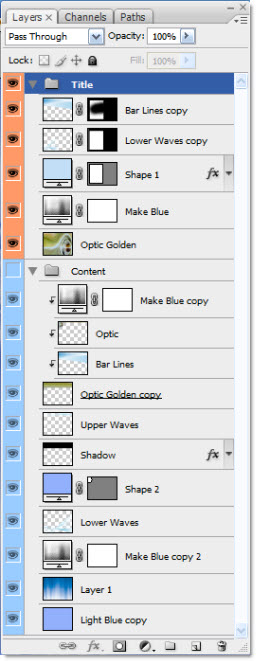
This is a pet peeve, but I really hate receiving Photoshop files with none of layers named – it’s is a huge waste of my time to go hunting for a needed layer by turning on and off layers. So, as seen, I always label all layers in PhotoShop so modifications are easy because the layers can be quickly identified.
I save out each of the backgrounds as a .jpg with a compression level of 10. From there it is all PowerPoint!
– Troy @ TLC
I’ll Be Back!

I have 4 blog post series almost done(PPTPlex, Illustrator-to-PowerPoint, Animation, and more), but I am in the midst of several LARGE projects overlapping right now that have every moment at the computer stylizing presentations. So check back this next Monday for things to be back on track with a lot of great posts rolling out one after another!
– Troy @ TLC
PPTPlex – A New View of Presentations!
Okay, this is some pretty cool stuff! Microsoft Labs (kind of an R-&-D group that releases software that MS makes no guarantees about or support for) has made a PPT 2007 add-in that changes the way you think about slide navigation.
Imagine one slide having a dozen very very small thumbnail images of other slides and then those slides having even smaller thumbnail images of more slides. View the first slide, click on a thumbnail and zoom into it. Go through the slides in order or zoom back out to go to a different topic/section!
This one is easier to see explained, so click here for movie overview. I will be experimenting with PPTPlex this week and should have a few samples posted.
– Troy @ TLC
indisain.com – Images for Presentations
In searching for images for a current project I stumbled on indisain, a royalty free site that offers all images free of charge.

You do need to register in order to login and download images (without a watermark). I found the variety good, but the image size varied from usable (1280px wide) to unusable (100px wide). Images are categorized, but limited search capabilities with categories. And some categories had more images than others, such as the landscapes category with 72 pages of images.
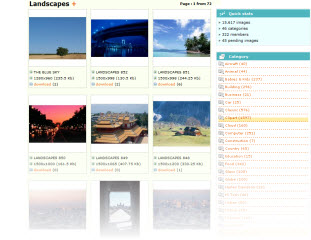
If you need another image resource, you can check out indisain here.
– Troy @ TLC
Two Versions Of PPT Installed? Launch ‘Wrong’ Version?
I run multiple versions of PowerPoint on my systems – namely PPT 2003 and PPT 2007 (although a few have all versions from 97 to 2007). If you run multiple versions, then the new set of security updates from Microsoft yesterday probably changed your default application.
I still have PPT 2003 set as my default version of PPT. But the latest security updates change the default application to PPT 2007. So now when I double-click on a presentation file it opens in PPT 2007.
The fix is fairly simple – just click here for a post I made all the way back in ’06.
– Troy @ TLC
Vector Cartoon Images
This is a fun resource I discovered recently.
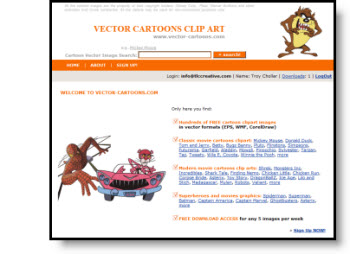
Vector-cartoons.com does require registering and has a weekly download limit. I was able to find exactly what was needed – as a high-quality fully editable vector image!
Note: for PPT download the .wmf version (I downloaded the .eps, modified in Illustrator and then exported as a .wmf).
– Troy @ TLC
Erase Personal Information From Presentation
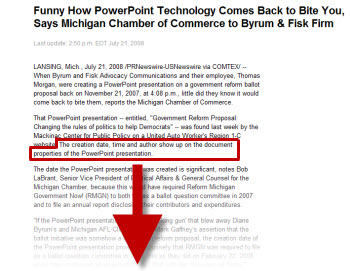
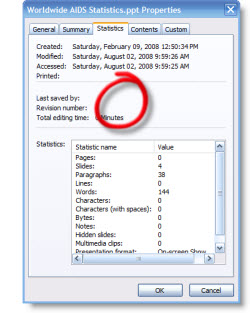
“The creation date, time and author show up on the document properties of the PowerPoint presentation.” (for the curious, you can read the full story here).
Have you ever been concerned with too much information being included in your presentation? Maybe even information that is not on a slide, but buried in a link or the file properties… I have for years tried to keep my clients out of trouble by removing often removing their personal information, or sometimes the TLC Creative Services information from the file properties.
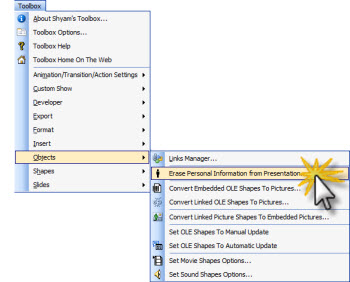
My tool for doing this – the Shyam’s Toolbox add-in.

Just go to TOOLBOX >> OBJECTS >> ERASE PERSONAL INFORMATION FROM PRESENTATION
No the file properties are clear – no time stamp, no amount record of hours worked, etc.
It is just one of the many tools in the add-in package, which runs approximately $50 – but it can be worth it as the above story points out!
– Troy @ TLC