
Fonts that Ship With PowerPoint
Here is an article on Microsoft Office Online that I collaborated on:

“Fonts that ship with different versions of Office” covers what fonts are installed with each version of Office (from 2000 and up). I have had a version of this information on my computer for years so I can design a presentation using fonts I know the recipient is certain to have on their computer.
To view, click here.
– Troy @ TLC
Open PowerPoint in Safe Mode
This is one of those – I hope you don’t need to do this – actions. But recently one of the computers here suddenly decided it did not want to have fonts work (line spacing was all messed up). So after troubleshooting everyway possible, verifying files opened fine on other computers, etc. I had the faint memory of being able to start any office application in Safe Mode.

After a quick search on the PPTFAQ (thanks Steve!) I restarted PowerPoint in Safe Mode by holding down the CTRL key.

Not sure what the solution was (not opening with AutoCorrect or Recent Documents…. ?), but the file opened and displayed text as designed. Closed PowerPoint, launched again and all was fine from there.
So when all else fails, starting PowerPoint with no extended features using Safe Mode can be your best friend.
– Troy @ TLC
Give Away of the Day – PPTMinimizer 4.0
Just a quick post. Today, and only today, the website GiveAwayoftheDay.com has the PowerPoint optimizing application PPTMinimizer. You can download and install for FREE.
To download click here.
Note: must be downloaded AND installed today to validate complimentary serial code.
– Troy @ TLC
PowerPoint eConvention
So what is an “eConvention”? Well, Shawn Toh of PowerPoint Heaven, also a PowerPoint MVP based in Singapore has created an online convention specifically for PowerPoint designers.

September 1-26 (now) is open for anyone to review the entries and vote. Categories are Animation, Artwork, Game and Broadcast. Some are downloadable presentations, some are viewable on YouTube movies – all are very impressive!
Then on Sept. 27 the eConvention comes to a close with all of the award winners posted.
Check out the entries, and how to submit your own entry, here.
– Troy @ TLC
Point, Click & WOW!
The third edition of “Point, Click & WOW!” is a great resource if you do deliver presentations to an audience of any size. Claudyne Wilder has written a number of excellent books on PowerPoint and presenting, all excellent and provide great insight, support and information that everyone can make use of. And if you happen to be in Boston Thursday, September 18 you can hear Claudyne speak and do a book signing!
Check out the details on her website here (or check out Amazon by searching for the title).
– Troy @ TLC
Blue Lens Template Download
The Blue Lens template I have used as an example was one of the concepts I created for a client. Obviously I ‘debranded’ it by removing any reference to a company or event, but now you can download the full template to review or use!

Download the template (saved as .ppt, not a .pot) here. Enjoy!
– Troy @ TLC
Setup of a Template
With the background elements developed in Photoshop and saved out as .jpg images the rest of the work happens in PowerPoint. Most of the work in setting up a template happens on the Master Slides. So the first thing for me is to set the background of each slide layout with the background artwork.
The Blue Lens template has a Content slide and a Title slide.
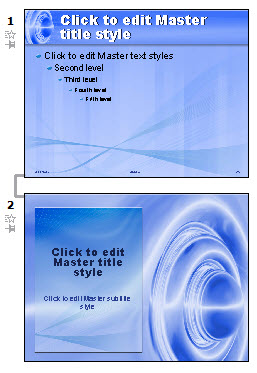
Next is to position the text boxes to fit the background, set the font size-color-line spacing and custom bullets:
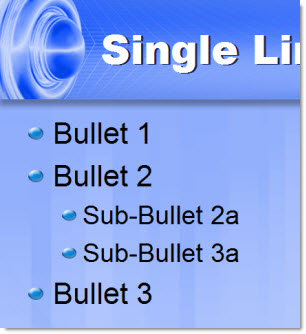
I also set default slide transitions for each slide layout (in this case both use a FADE SMOOTHLY), format the header/footer text boxes, etc.
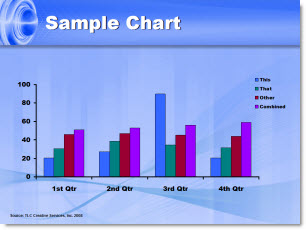
One of the things I think a lot of people overlook is customizing the color scheme. I always include a sample chart that shows all of the default colors I have setup.
Now everything is ready to build a slide show!
– Troy @ TLC