
Organize and Enhance Movies in Presentation (1)
Do you think of the aesthetics of the slide when adding a movie? Are you satisfied with the fact that the slide is now “high-tech” because it has a movie? Well, that must be the thinking of lots of presentations I receive, as there is often no thought of the overall slide layout and aesthetics.

(1) If there is no other content on the slide, center it.
(2) Respect the template background elements and position the movie within these boundaries (ie. don’t have it overlap the title bar or other framing elements of the background design).
Sounds simple but I see dozens of presentations where movie placement is an after thought.
– Troy @ TLC
PPT and Vista/Wacom Bug Fixed!
Once again I have good news and one less reason to reformat my computer! Wacom has recently released a new set of drivers for its tablets – which I use. If you look back to the May 13, 2007 post I mentioned an annoyance with objects jumping around when selected.
Well I narrowed it down to either the Logitech or Wacom drivers, but had no solution. Over the weekend I installed the newly released Wacom driver and PowerPoint behaves once again!
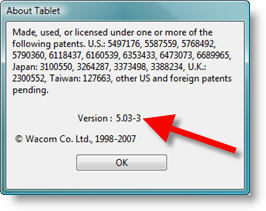
If you a Wacom tablet on a Vista machine, go here and get the latest drivers.
Okay, one more reason to keep Vista installed.
– Troy @ TLC
Vista Display Driver Updated!
So I have been tempted to reformat my primary computer, which is running Vista Ultimate, and go back to XP (on many occasions). What keeps me from this drastic action? Really it is a lack of time – if I am in front of a computer I am busy working on a project (which almost 24/7 lately) and the thought of taking time to deal with the nusances of Vista just does not make my priority list right now.

One of the major issues has been this fantastic 512MB graphics card having the features of a 10 year old model. In other words, it had no advanced features – Such as Flat Panel Scaling.
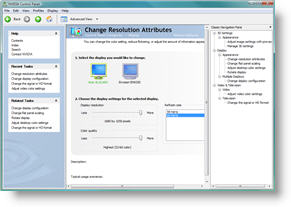
Well NVidia has finely come through provided a robust update to its control panel and now I can actually use this computer to run a show if needed (which I generally don’t do – this is my production computer, I have a small fleet of ‘show’ computers for that task). Of course my thought has been that by next year all of the Vista issues I am experiences will be resolved as software catchs up. But for now – one annoyance resolved!
– Troy @ TLC
Giuliani’s PowerPoint Presentation
Former NY Mayor Rudy Giuliani recently made the news with a link to an PowerPoint presentation used to show the statistics and other information about the current positioning of the political race. If you are interested, click here to read the article (only if you are politically interested in such info).
But the real treat was looking at a ‘professional’ presentation!

Click here to view the presntation.
Now I’m not a big fan of stock templates, but even those would have been a huge help to the aesthetics of this presentation. If anyone knows people in the Giuliani office, feel free to pass along a link to ThePowerPointBlog so they can pick up some design and layout tips.
– Troy @ TLC
Where’s My .PCB File in Vista?
So your PowerPoint toolbars have exploded and you need to reset them with your backup .pcb file (file that contains your customized toolbar settings). But you have just upgraded to Vista and it is no where to be found!
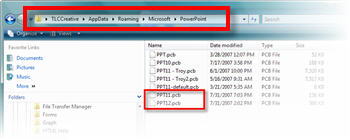
Here is where you need to go:
C: >> Users >> (Your Name/Account) >> App Data (will need to be able to view hidden folders) >> Roaming >> Microsoft >> PowerPoint

– Troy @ TLC
Creating the Theme Logo (5)
It has been a road full of design choices – and we have a winner!

(I will let you guess which version of this design was selected)
– Troy @ TLC
Creating the Theme Logo (4)
If you look back at the theme logos created so far, it is obvious how the template would be very different for each. So up to this point I am unable to really start working on the PowerPoint template.
But the goal is to make this event a success, and that begins with the client liking and appreciating the core visual to the whole thing – the theme logo.
– Troy @ TLC