
Oh the Places You’ll Go (#1)
One of the great things about corporate shows is traveling to exciting places. I discovered this at an event in Dallas, TX at the Anatole resort. On the grounds they have a big section of the Berlin Wall for all to see!

– Troy @ TLC
Little Treats (#2)
When working a long show, with long hours, sometimes having a little snack is just what you need. Here Steve Hodges, show coordinator extraordinaire, has bravely left his little treats sitting out for all to see (and take).
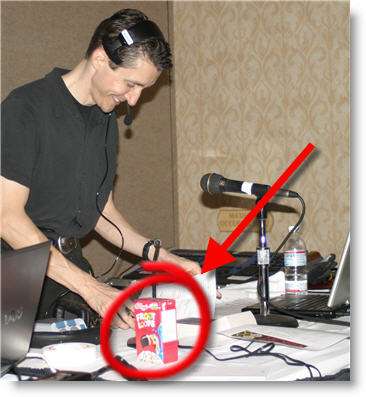
– Troy @ TLC
Instant Giftstore – iPod Vending Machine (#3)
‘Tis the season where shopping is often an experience to be avoided. But here is the perfect solution! I took this photo at the convention center in Atlanta. Insert your credit card and have an iPod (shuffle, mini, video, etc.) drop out of the slot! No lines or crowds. It also made instant purchase available for docking stations, power supplies, headphones, PSPs and more.
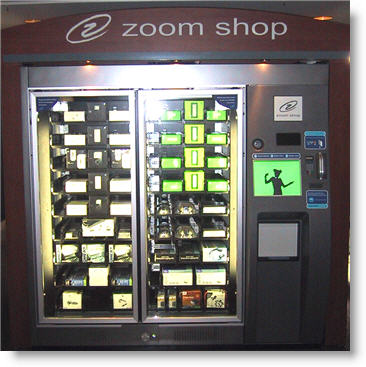
– Troy @ TLC
It’s All About The Gadgets (#4)
Even the straight forward shows need some nifty gadgets. In addition to having multiple sources (one set of computers for widescreen projection, second set for coordinated graphics on plasma displays throughout room). Note the three preview monitors that give me a heads up on what is being sent, and going to be sent – including the very cool 6” high-resolution widescreen display (#3).
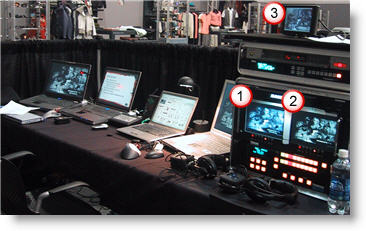
– Troy @ TLC
It’s All About The Chair (#5)
It is the holiday time, so I have compiled a fun “5 Holiday Treats” series. And here is #5:
Running corporate presentations means sitting in ballrooms, convention centers, conference rooms and basically any place that is generally uncomfortable. As a matter of personal preservation, it often comes down to what chair you are going to be stuck sitting in for the next several days.
At this particular show I managed a very comfortable seat! Hey, maybe all ballrooms are not that uncomfortable.
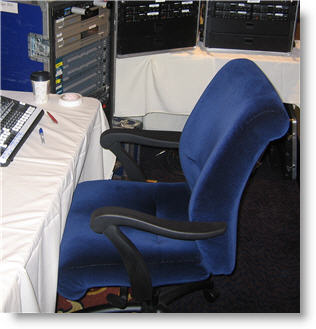
– Troy @ TLC
Multiple Bandwidth (Streaming vs. Standard Server)
Not all streaming media is created equal. The most advanced streaming media formats are a two-part strategy; first the streaming media is created in multiple versions, second it uses a special streaming media server.
The advantage of multiple bandwidth media is that a viewer with a slow connection gets a lower-quality movie. A viewer with a high speed connection gets a higher quality, larger bandwidth movie. The simple explanation is the movie has several versions all contained in a single file. The streaming media server has the ability to determine the speed of the connection of the viewer and shows them the file that is optimum for their connection.
A Streaming Server is designed specifically for streaming media. It runs specialized software that allows it to “see” the viewer’s connection speed, work through most firewalls, handle large simultaneous connections, implement DRM (Digital Rights Management) and stream without downloading. The last point is the “magic”, it literally plays the streaming media directly from server not the (progressive) downloaded file.
A (standard) Web server is not designed for streaming media, but it is the most common server and tons of streaming media is hosted on it. It streams using a method called progressive downloading. The file is downloaded to the computer’s browser cache and can only play what has been downloaded. Seeking, or jumping, ahead does not work until the entire file is downloaded. Playback is also more likely to be interrupted by periods of buffering (when the player is not receiving the file fast enough) and playback can be affected by the number of people trying to view it at the same time.
Note: A multiple bandwidth file can be hosted on a web server, but because a web server cannot recognize the various speeds built into the file it simply plays the highest bandwidth option (which is most likley poor playback quality as most viewers will not be able to support the super high bandwidth version). It’s like putting a square peg in a round hole – a bad idea…

– Troy @ TLC
What is a “Key Frame”
A movie is a series of images played rapidly to create movement. Remember webcasts are all about throwing away unneeded data. The Key Frame is a critical component in what the file size will be.
Video software takes the original movie and compresses it. The Key Frame compression process only keeps the changes from one frame to another. So if you have a PowerPoint slide on Frame 1 and the only difference in Frame 2 is the mouse moves, Frame 2 will only consist of the part that shows the mouse movement.
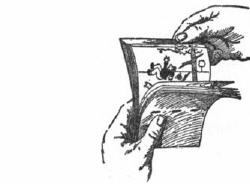
With compression there are two types of frames:
1. Key Frame: the entire frame
2. Delta Frame: only has the area that changed
Key Frames
Within video software is the option to change the Key Frame Rate. The fewer Key Frames you use the smaller the file size. Here are two examples:
1. For PowerPoint content, where little changes from frame-to-frame, use a high Key Frame Rate (10-80).
2. For live video, where the constant motion has lots of change from frame-to-frame, use a low Key Frame Rate (1-12).

Frames Per Second and Key Frame Rate
Within video software the Frames Per Second (fps) can be adjusted. We need to consider the fps when setting the Key Frame Rate. We need to really consider how much changes from frame-to-frame how often. Here are to examples:
1. If encoding at 30 fps and the Key Frame Rate is 80, a new Key Frame will occur very quick – about every 2.5 seconds.
2. If encoding at 5 fps and the Key Frame Rate is still set at 80, the Key Frames are nearly 40 seconds apart.
– Troy @ TLC