
Looking for the (Lorum Ipsum) Words To Say?
When developing a presentaion the real text is often not available for the first proof. So what do you do? I add “greeking” or lorum ipsum text.
Should you need some professional greeking text all you need to do is head over to www.lipsum.com and use the quick wizard to create the amount of text needed. Then just copy and paste into the presentation. And as a bonus you can also read the history of Lorum Ipsum text!
– Troy @ TLC
FareCast – A Must for Purchasing Airline Tickets!
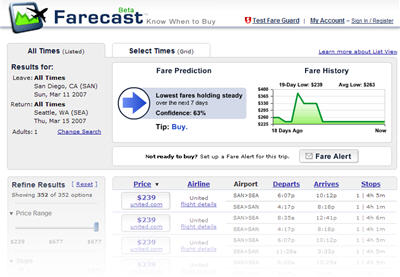
So I recently discovered this new site and its airfare prediction services – very amazing! If you are familiar with the Xcelcius software (adds real-time interactive charts to PowerPoint) that is what this site reminds me of.
Select the airports and needed dates and it provides not only flight information, but a history of prices for the flight and suggestions on if you should buy now or wait for ticket prices to go down!
Check it out at www.farecast.com.
– Troy @ TLC
Oh The Beauty of Christmas Lights
After this past weekend I have to spend a few days putting away the holiday decorations once again :(. Things have been great around here, my girls are still at that magical age of believing in Christmas, I have eaten far to much and the whole block goes into decorating overload (which is perfect by me).

I hope 2007 looks bright and full of great things for you! I have no plans to change anything here at ThePowerPointBlog except to have even more content added throughout the year. Have a super week!
– Troy @ TLC
HAPPY NEW YEAR!!!
365 Days ago was the exact same title – the very first post on ThePowerPointBlog! We have made it through 2006. Though things never seemed to slow down, I felt like a great variety and diversity of using PowerPoint occured throughout the year (who would have imagined even a few years ago an entire series dedicated to streaming media – all evolving out of PowerPoint requests!).
In doing a quick check I:
– Made 201 posts.
– Added 256 images
– Had approx. 25,000 unique visitors
– Had a ton of fun!!
Thanks for visiting The PowerPoint Blog – send an email any time (ideas, questions, encouragement, etc.)!
– Troy @ TLC
Microsoft Internet Explorer 7.0 Keyboard Shortcuts
With the new version of Internet Explorer (which I have been using with no problem for the past 3-5 weeks on 5 computers) comes some new ways to use it. IE7 now features tabbed-browsing (yeah!) and these are the keyboard shortcuts to take full advantage of the new features:

CTRL+click (Open links in a new tab in the background)
CTRL+SHIFT+click (Open links in a new tab in the foreground)
CTRL+T (Open a new tab in the foreground)
ALT+ENTER (Open a new tab from the Address bar)
ALT+ENTER (Open a new tab from the search box)
CTRL+Q (Open Quick Tabs – thumbnail view)
CTRL+TAB/CTRL+SHIFT+TAB (Switch between tabs)
CTRL+n (n can be 1-8) (Switch to a specific tab number)
CTRL+9 (Switch to the last tab)
CTRL+W (Close current tab)
ALT+F4 (Close all tabs)
CTRL+ALT+F4 (Close other tabs)
– Troy @ TLC
Software to Convert PowerPoint to Flash
Received this email after the Streaming Media series posted:
“Hi. I am looking for software to convert PowerPoint presentations to Flash. What do you recommend? I tried Articulate and Camtasia. Only Camtasia converted everything in the original ppt slides. But the file was very large. The other programs left out font characters, loused up the audio, had other problems (but made a smaller file). Any help appreciated. Thanks.”
Thought I would share my reply:
You have tried two of my choices for software, so you’re on the right track. The main thing is you have two different approaches and you need to determine which is what you need:
1. Convert to a movie (Camtasia).
2. Convert to vector based images (Articulate).
A movie file will be much larger than a vector based flash file. Creating a movie is a bit tricky, as you can literally have the same movie output at 700MB or 23MB depending on size, bit rate, format and many other variable (as I just did today using Camtasia for a client webcast).
Here are two additional software choices that I have in my arsenal, not to say any one is better than the other.
1. Wildform Presenter Pro – The most difficult of all these programs to master, but it can produce some of the most effective vector based conversions of any program, being able to truly convert all animation effects.
2. Presenter Pro – Very, very similar to Articulate.
The advantage of converting to a movie is that what you see on your computer is captured. This includes custom fonts, bullets, animations, etc. This is why Camtasia captured everything as designed. The downside is it plays straight through (it is a movie) and is a larger (sometimes extremely large) file.
The advantage of converting to a true vector based Flash format is that the file size is tiny, the file can be resized without much quality issues, and it can pause at each slide easily. Downside is fonts need to be outlined, or they will default, custom bullets will not work, etc.
There are at least 10-20 applications out there, but these 4 really are the cream-of-the-crop and will give you the best results. Depending on the project determines which one I use, so keep experimenting with the software and different formats.
– Troy @ TLC
Christmas Themed Template
Merry Christmas!!!
This is a great time of year – first, I have opportunity to focus on design work from my office (eg. I’m not traveling to corporate shows every week) and I also get to enjoy my kids’ excitement for the holidays! As way of saying Merry Christmas to all, please download this custom PowerPoint template I designed specifically for all who visit ThePowerPointBlog.
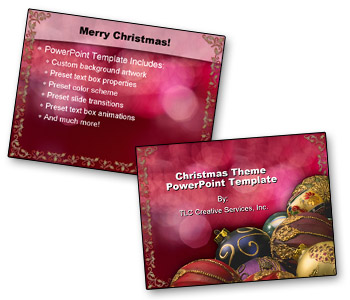
This is one features an elegant Christmas theme. As with all PowerPoint templates I develop this one features:
– Theme specific backgrounds developed in Photoshop
– Text boxes have preset position, font style, font size, font color, line spacing and bullets
– Preset entrance animations for text boxes
– Preset slide transitions
– File properties and header/footer information preset
– Presentation color scheme, customized to coordinate with background artwork
Click here to download (approx. 800k)
– Troy @ TLC