
New Crystal Xcelsius Tutorial (by Glenna Shaw)
Glenn Shaw, a Microsoft PowerPoint MVP, has been up to her magic again. This time she has created a whimsical tutorial that explains and shows how Crystal Xcelius can be used to create truly dynamic charts/graphs for PowerPoint. Check out the “Visually Analyze Resource Impact” tutorial here.
Xcelius is a very powerful tool and can also be integrated into websites. For a really fun and whimsical example, check out Glenna’s Cinderella Project (as in Disney Princess).
Troy @ TLC
5,000 Patents and going strong!
So how big is Microsoft? Well on Tuesday Microsoft was issued their 5,000th patent! Sounds like a lot, but I did a quick search for IBM’s patents to put things in perspective. “In 2005, IBM received 2,974 U.S. patents… this is the thirteenth consecutive year that IBM has received more US patents than any other company in the world.”
But it does make Microsoft “among the top five technology companies in terms of patent filings.” That’s a lot of paper work – and I bet it is not doing much for the ‘paperless office…’ Here is a good write-up on the Microsoft milestone.
Troy @ TLC
Choose Your Own Adventure Presentation
So what do you do when your daughter’s teacher calls and says they are having a PowerPoint crisis… pack up a laptop and head to school. Fortunately this proved to be a fun project, fairly easy to solve and a unique use of PowerPoint. Unique enough to share here.
Remember as a kid reading the ‘choose your own ending’ books; each chapter ended with a “To go through left door turn to page 64” and “To go through the door on the right turn to page 71.” That is exactly what the elementary school class project was. In this case each slide was a portion of the story and the viewer has the option of going to one of two storylines. Fun and creative – but needed for an open house this Wednesday!
While in the classroom I designed and programmed the template file, which you can download here (feel free to view, use and distribute).
Because everyone from the Teacher, volunteers and students need to know what to do with the presentation template I headed back to my office and created this quick tutorial movie using Camtasia (which I supplied to my daughters instructor on CD). View the online version here.
I hope to have the completed student story posted on Wednesday or Thursday. And last, I have been asked by many to activate the ‘comments/feedback‘ features on the blog. Well here is one I am opening up to comment, so please feel free to share about PowerPoint in education or anything about this file and tutorial.
Troy @ TLC
Sometimes Mass Input is a Bad Thing
Okay, so this is a parody on Microsoft – and it is very funny. But it also applies to the way lots of slides and presentations are designed. The more people that need to provide input, the more content has to be added to each slide… Just something to think about (and figure out how to manage).
[UPDATE] The original link was taken offline this afternoon. So here is a fresh link. Click here to view.
Troy @ TLC
Advanced Animation Timeline
When you need to fine tune the animation timings, you need to display the very powerful Advanced Timeline. When you open the animation pane, which do you see:
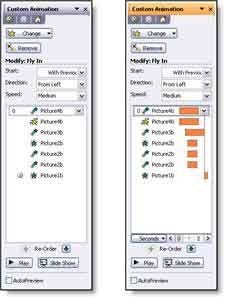
With the advanced Timeline you can see the duration, start and end for each animation in relation to the other animations. For advanced animation needs the WITH PREVIOUS setting is utilized more and the animation start position and duration are adjusted with the Advanced Timeline (as example when a subtle overlapping animation is needed).
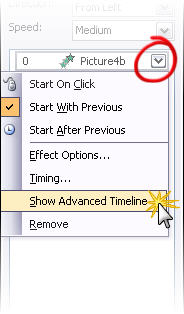
To see the Advanced Timeline, click any animation and choose SHOW ADVANCED TIMELINE.
There are some good examples of the advanced timeline in use on the Tutorials page.
Troy @ TLC
Presenter’s University Interview
I was interviewed by Presenters’ University at the end of January. But I just found out it was posted (probably weeks ago…). Feel free to check it out here.
Troy @ TLC
I don’t remember it like this….
We have to remember that what we show and say during a presentation may not be telling the whole story. Take for example this re-edited movie trailer for the Shining.
I don’t remember the warm-fuzzy family story with the happy ending…
Troy @ TLC