
add-in

Fix Links Pro Fixes A Hidden Problem

Sometimes you don’t want to give away to much information. And when an Excel chart or movie is inserted you are giving away information about your network/file structure.

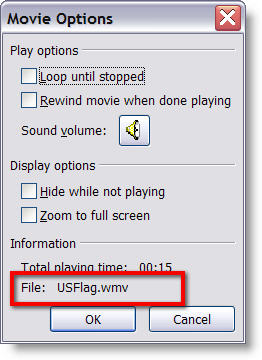
As example, right click on a movie that is inserted into PowerPoint and choose EDIT.
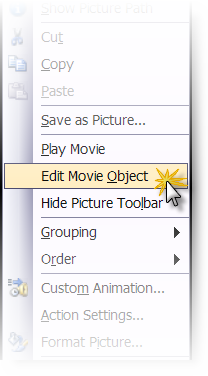
The movie information includes the path where it came from.
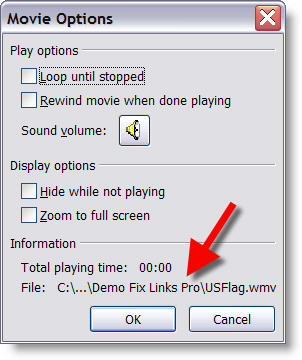
To eliminate this information I use the Fix Links Pro add-in (website is here).

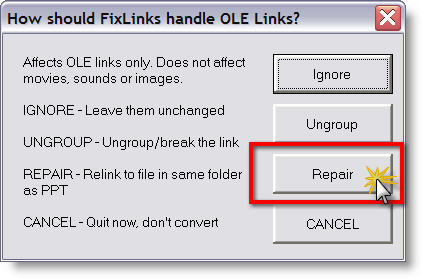
(1) Open Fix Links Pro and choose REPAIR
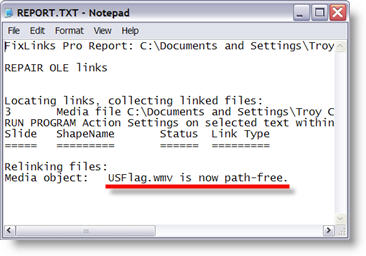
(2) It generates a report about all multimedia and embedded files in the presentation. The key is where the report says “now path-free”.
(3) Now right click the movie, choose EDIT and see that the path information has been removed
– Troy @ TLC
By |2016-11-17T14:32:26-08:00October 25th, 2006|Software/Add-Ins|

Perspector 3 Update

This week Steve Hards from Perspector sent me an notice that they have released a minor update to its recently released version 3. The update installs on top of existing versions and in addition to fixing some minor bugs, has a huge upgrade to the image quality!

Perspector is a 3D add-in that allows you to convert any object or text on a slide to a true 3D element. It has a great library of 3D template objects which can be easily modified to match your slide.


Check out Perspector and download the update here.

-Troy @ TLC

By |2016-11-17T13:50:04-08:00June 7th, 2006|Software/Add-Ins|

Perspector 3 adds 3D Shapes to PowerPoint


Yesterday I downloaded and installed the latest version of Perspector – version 3, which was released earlier this week. The update (from version 2) went smooth and in experimenting it is easy to see that it now has even even larger library of 3D elements and some really impressive charts. Check out all of the details at the Perspector website!

Glen Miller, has some great tutorials and samples using Perspector. Click here to see some real world samples of Perspector in use.

~ Troy @ TLC

By |2016-11-17T13:53:02-08:00May 26th, 2006|Software/Add-Ins|

NXPowerlite 2.2 Released

Today, NXPowerlite has released version 2.2 of their excellent PowerPoint presentation compression software. Some of the new offerings include:
– Speed and interface enhancements
– If attaching a presentation to an email message with Outlook it can be compressed without opening anything additional
– Now supported in 6 languages (Spanish and Japanese added)

Read all the info here.

– Troy @ TLC

By |2016-09-16T11:32:57-07:00March 20th, 2006|Software/Add-Ins|

New Crystal Xcelsius Tutorial (by Glenna Shaw)

Glenn Shaw, a Microsoft PowerPoint MVP, has been up to her magic again. This time she has created a whimsical tutorial that explains and shows how Crystal Xcelius can be used to create truly dynamic charts/graphs for PowerPoint. Check out the “Visually Analyze Resource Impact” tutorial here.

Xcelius is a very powerful tool and can also be integrated into websites. For a really fun and whimsical example, check out Glenna’s Cinderella Project (as in Disney Princess).

Troy @ TLC

By |2016-09-16T11:30:34-07:00March 11th, 2006|Software/Add-Ins, Tutorial|

NXPowerlite 2.1

NXPowerLite has released version 2.1 of their PowerPoint optimizing program. I have spoken with the guys at NXPowerLite for the past few years and earlier this year I tested version 2.0. On that version I noted that almost my entire wishlist had been incorporated! Most notable is support for .png with transparency images. Now v2.1 overcomes CMYK problems and a few other fixes.

I highly recomend it as a solution for oversized presentation files. Get it here.

Troy @ TLC

By |2016-09-16T11:15:18-07:00January 8th, 2006|Software/Add-Ins|
Go to Top