Resource/Misc

SharePoint Calendars and Internet Explorer Visual Formatting Issue

TLC adopted Office 365 before it was publicly available and have only good things to say about its use in a small business environment. Recently something has gone awry with the SharePoint calendars – something we rely on daily.

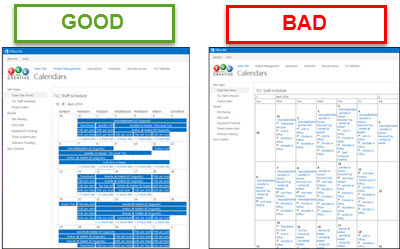
Up until 2 weeks ago, they looked like the left example, but suddenly the visual formatting changed to the ugly and hard to use right example.

But this formatting issue is only seen when using Internet Explorer. If logged in with Firefox, Chrome or any other browser, nothing changed, all looks good. So ironically, only the Microsoft web browser seems to be rendering the Microsoft SharePoint calendars useless!

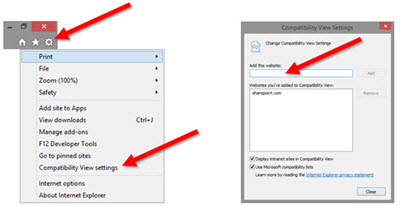
After some research and testing, here is the fix we have implemented on every computer here:

– Open Internet Explorer
– Click the TOOLS icon in the upper right
– Select COMPATABILITY VIEW SETTINGS
– In the ADD THIS WEBSITE field, enter SHAREPOINT.com
– Click ADD and CLOSE
– Now SharePoint calendars should once again display as expected

– Troy @ TLC

By |2016-08-10T09:46:05-07:00April 19th, 2014|Resource/Misc, Tutorial|

Duarte Releases SlideDocs ‘Book’

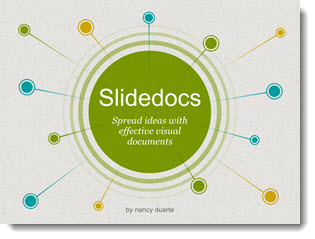
If you have used PowerPoint to create a print document that was never intended to be projected as a slide show, fear not, you are not alone. TLC Creative Services has been creating lots of projects over the past few years that we internally refer to as “PowerPoint Documents.” Nancy Duarte has release a new “book” all about using PowerPoint for non-slide show documents called “SlideDocs.”

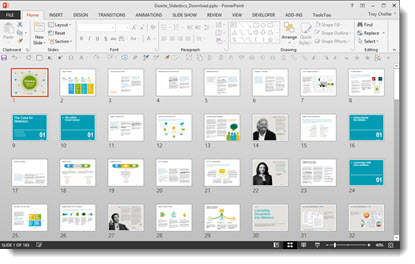
The downloaded book is a giant example of how PowerPoint is used for document design, because it is a PowerPoint file.

The core message of SlideDocs, which I agree with, is there are a range of documents. On the left are formal print design documents. On the right are slide show presentations. In the middle are print documents that are designed in PowerPoint.

I recommend everyone, especially clients, read SlideDocs if nothing else for the overview of graphic design and layout principles in the middle section. Get more info and download the free SlideDocs book and templates here.

– Troy @ TLC

By |2016-08-10T09:47:41-07:00March 20th, 2014|PowerPoint, Resource/Misc|

Office 2013 SP1 Released

Last Wednesday, Microsoft released the first Service Pack (SP) for Office 2013. The list of updates to PowerPoint is fairly short and deals only with stability issues – no new features or refinement of current features. If you want the details, here is the Microsoft KB article on Office 2013 SP1.

The world of MS Office is now split into two types of installs: MSO (installed from an actual installer app) and CTR (click-to-run which is a cloud based install). How you get SP1 depends on what type of install you have.

Unfortunately, there are not labels on the About Screens that tell if an install is MSO or CTR. Here is one way of identifying the install type:
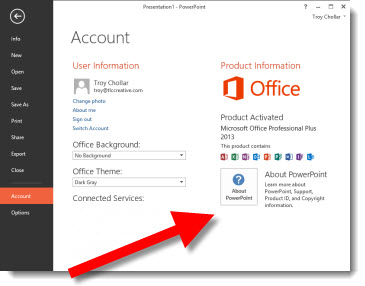
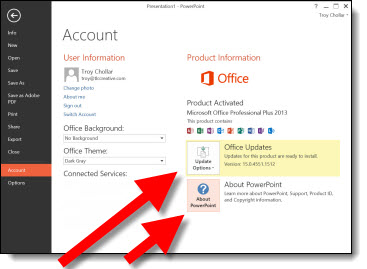
Go to FILE >> ACCOUNT >> look at the info in right pane.

If there is only 1 box “About PowerPoint” – it is an MSO install.

If there are 2 boxes “About PowerPoint” and “Office Updates” – it is a CTR install.

If you have MSO (traditional installer), the update should be available through Windows Update. Or, you can go direct to Microsoft and download the SP1 installer.
32-bit Office = https://www.microsoft.com/en-us/download/details.aspx?id=42017
64-bit Office = https://www.microsoft.com/en-us/download/details.aspx?id=42006

If you have CTR, SP1 will automatically install when you are online.

– Troy @ TLC

By |2016-08-10T09:50:12-07:00March 3rd, 2014|PowerPoint, Resource/Misc, Tutorial|

Webinar by Troy – PowerPoint 2013, What’s New, Better, and Different

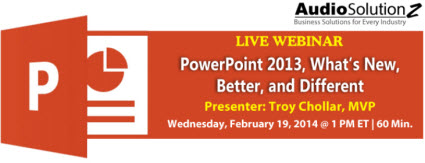
AudioSolutionz has asked me to present a live webinar on PowerPoint 2013. It will be this Wednesday, February 19 at 10am PT/1pm ET.

I have a large list of features that are new for the application, the designer, and the presenter.

Knowing where the PowerPoint 2013 new features are, how to turn them on, and how to use them can be a frustrating experience of trial and error. This is a one-stop overview the new features demonstrated and explained. Session Highlights:
• Learn what is new with video: playback, export and usable formats
• Discover 6 menus that are no longer pop-up dialogs – and have added formatting features
• Instantly apply any color on the screen to a shape or text in 2 clicks!
• Explore all the new slide transitions
• What are Smart Guides, and what is “Equidistant?” – they are both in PowerPoint 2013
• Widescreen is now the default, but it is not the same as the old widescreen
• Presenter View is now useable
• Learn how to zoom in on a slide – during a presentation
• and more, plus Q&A

Details and registration is here.
Use the promo code “Troy 20” for a $20 discount.

– Troy @ TLC

By |2016-08-10T09:51:01-07:00February 17th, 2014|PowerPoint, Resource/Misc|

Live Webinar – PowerPoint 2013, What’s New, Better, and Different

Next month, I am the presenter for an AudioSolutionz webinar “PowerPoint 2013, What’s New, Better, and Different.” With the number of companies transitioning to Office 2013, I have been asked to demonstrate my favorite features and overview what’s new and improved. Here is the webpage with all the details (Note: I will post a discount code next week).

https://www.audiosolutionz.com/1001-conference-updates-to-powerpoint-2013.php?utm_source=E99NACK2M

– Troy @ TLC

By |2016-08-10T09:52:10-07:00February 3rd, 2014|Resource/Misc|

2014 Color of the Year

Funny thing happened this weekend while at the local Home Improvement store – I learned the official 2014 Color of the Year! Not what you would expect to learn while looking for light fixtures, lumber and nails. But there it was, right up front near the check out registers, 4′ high in the paint department.

Each year, the Pantone Color Institute chooses a color of the year, and that selection has a big impact on design, art and fashion. 2014 is the year of “Radiant Orchid” – guess I better start working that into some template designs!

Radiant Orchid is “an invitation to innovation, Radiant Orchid encourages expanded creativity and originality, which is increasingly valued in today’s society.” It is “an enchanting harmony of fuchsia, purple and pink undertones… (that) inspires confidence and emanates great joy, love and health.” Leatrice Eiseman, Pantone Color Institute director.

– Troy @ TLC

By |2016-08-10T09:56:40-07:00December 30th, 2013|Personal, Resource/Misc|

Themed Lorum Ipsum Text! Pirate – Corporate – Coffee – and More!!

Lorum Ipsum, or Greeked Text, is placeholder text that has no meaning. Its purpose is to demonstrate how text will look in a layout, in a specific font, size and color. It is also, very helpful for PowerPoint templates and foundation presentations.

Traditional Lorum Ipsum text is a nonsensical latin (created by a 1st century Latin text by Cicero), and looks like this:

Lorem ipsum dolor sit amet, consectetur adipiscing elit. In lacus nisi, tincidunt non purus vel, hendrerit imperdiet urna. Mauris in mattis eros. Nulla ligula arcu, pretium eget justo nec, cursus rhoncus lectus. Nullam eu est blandit, faucibus elit at, pellentesque lectus. Maecenas a vulputate mauris. Donec quis dictum metus. Phasellus at nisi tempus mauris sollicitudin fermentum. Interdum et malesuada fames ac ante ipsum primis in faucibus.

For the above text I used the Lorem Ipsum text generator at lipsum.com (see this January 2007 post).

But that can be boring and TLC is a creative company. So we were very excited about discovering “Meet the Ipsums!” MeetTheIpsums.com is a text generator for dozens of themed Lorum Ipsum text, such as coffee ipsum, cat ipsum, Zombie Ipsum, Canada Ipsum and more!

Here is a personal favorite – Pirate ipsum:

Belaying pin chase coxswain list transom gally pillage broadside furl capstan. Hail-shot aft fore Davy Jones’ Locker careen killick mutiny weigh anchor bilge rat Nelsons folly. Chandler poop deck Blimey six pounders Buccaneer clap of thunder ye Barbary Coast keel Gold Road. Cable doubloon avast grapple interloper hang the jib boom heave down Sea Legs barkadeer.

Even better – not from a productivity vantage, but definitely better for fun and amusement – is that each Ipsum webpage is themed. Here is the interface for generating the above Pirate Ipsum text:

Themed Lorum Ipsum Text

Next time you have a project that needs themed Lorum Ipsum text, check out MeetTheIpsums.com!

– Troy @ TLC

By |2016-08-10T10:04:39-07:00December 2nd, 2013|Resource/Misc, Software/Add-Ins|
Go to Top