
Nothing to Report from the Microsoft MVP Summit
In day 3 of the Summit and day 2 of sessions with the PowerPoint program and dev team. But as you can see, I have nothing to report (except that a rare cloud failure occurred in Seattle yesterday and it was wonderful and sunny outside).
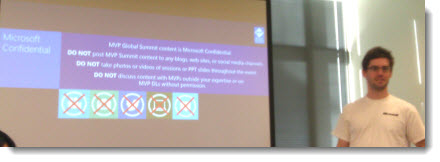
– Troy @ TLC
Greeting from Microsoft and the MVP Summit

I am in Redmond (Seattle) Washington this week at the MVP Summit. Two highlights of the week are meeting with the PowerPoint Dev team and being a part of feedback sessions and spending time with the PowerPoint MVPs!

(Glenna, Dave, Echo, Ric, Sandy, Troy, Steve, Shyam, Juno)
– Troy @ TLC
Showsite Pics From Prague
The recent show in Prague at the Hilton went great. Here is my view of things (note the super wide screen that is a permanent install along with a Pandora’s box system to create multiple PIPs, add background graphics, and more – very nice!)
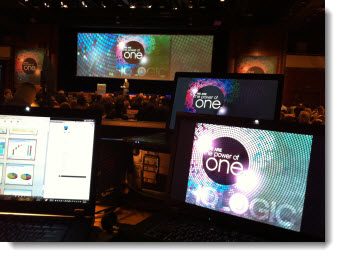
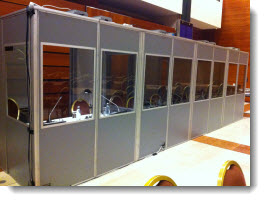
International meetings have unique needs. Along with all power needing to be adapted from U.S. connectors, there is always need for live translation. For this meeting, translation was in 8 languages (English being one of them).
– Troy @ TLC
PowerPoint 2013’s Updated Slide Sorter
There are a number of visual enhancements to PowerPoint 2013. Some I like, some not as much… One I really like is a small update to the slide sorter when reordering slides.
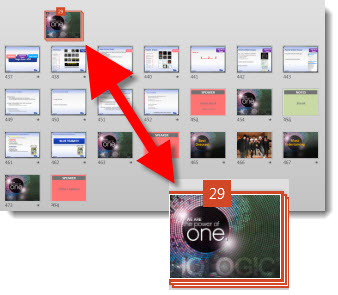
Now, when a group of slides are selected, they minimize to a small stack icon (here I have grouped 29 slides displayed as a single icon). This is a small update, but it makes it much easier to move large sets of slides and quickly see where the slides need to move to.
– Troy @ TLC
Greetings from Prague!
There are some perks to being the onsite graphics expert, such as travel. This past week, I have been enjoying the city of Prague in the Czech Republic – beautiful and friendly!

With international travel, I try to limit the amount of tech equipment I bring. In this case, I “only” brought 4 of the 8 needed computers. TLC Creative Services has a fleet of “Show Computers” that are optimized for presentation design and running slide shows. It is always good to work with familiar computers that have all the software, add-ins and settings expected to avoid issues.
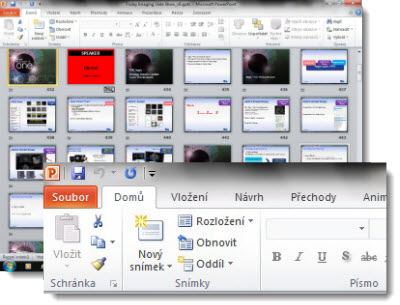
For example, here is an image of PowerPoint running on my local (country) rental computers – yes, that is PowerPoint in Czech! Good thing I know the UI and commands by memory!
– Troy @ TLC
Which Version of Office 2013 is For You?
Microsoft Office is available in a few options, but the biggest options are purchase the software or the subscription. As is typical of Microsoft marketing the options are not easy to find clear descriptions of, and the naming (ie. Office 365) is used in several ways.

To help, here is a description of each of the offerings (all information pulled from Microsoft).
Office Home and Student 2013
Gives you a variety of new and familiar features to simplify work and achieve incredible results with Word, Excel, PowerPoint and One Note. New Office Web Apps offer dynamic new ways to create access and share your files via computer, web browser or Windows Mobile based smart phone. Customizable templates, color schemes, dynamic text effects, photo and video editing capabilities allow for unprecedented creativity and put you in total control of your project.
Office Home and Business 2013
Powerful tools and smart, simple features help you tackle your busy schedule efficiently, work with others at home or on the road, and create reports and presentations that command attention. When you need to get it done right, Office Home and Business 2013 gives you the tools you need. Includes: Word, Excel, PowerPoint, OneNote, and Outlook.
Office Professional 2013
A complete suite of productivity and database software that includes the 2013 versions of Word, Excel, PowerPoint, Outlook, Publisher, One Note and Access. Includes the ability to access, edit and share documents any time from any place with an internet connection, sync your files and information with Microsoft Office Web Apps, broadcast presentations almost anywhere and also comes with easy analytical tools to process data and trends. Plus, it is easier than ever to organize work and projects, collaborate with others, build databases, manage finances and much more!
Office 365 Home Premium
The latest versions of best in class applications plus cloud services including Skype and SkyDrive on up to 5 PCs, Windows 8 tablets, and Macs. Includes: Office for the entire household on up to 5 PCs, Windows 8 tablets, and Macs. The latest versions of: Word, Excel, PowerPoint, Outlook, OneNote, Publisher, and Access. An extra 20 GB of online storage in SkyDrive (27 GB total) for anywhere access to your documents. 60 minutes of Skype calls each month to phones in over 40 countries. One convenient annual subscription for the whole household with convenient automatic upgrades.
PowerPoint 2013 Has Arrived!
Office 2013 was officially released last week. And as you can see, I have replaced PowerPoint 2010 and running PowerPoint 2013. Hopefully as a help, here are the most repeated questions I have been answering.
Do I need Windows 8 to use Office 2013?
No, Office 2013 will install and run on Windows XP, Windows 7 and Windows 8.
How confident are you in switching to PowerPoint 2013?
While I have been using Office 2013, and specifically PowerPoint 2013 for many months under the my NDA with Microsoft, I have experienced very few crashes or issues using the beta software. Now that is officially released, I had no problem instantly updating most of our computers to Office 2013.
Is there a lot of learning to use PowerPoint 2013?
If you have used PPT 2007 or 2010, it is very similar. The largest change to become familiar with is the new ‘Metro’ User Interface graphics – everything is still there, but with new icons. Many dialogs are now action panes vs. pop up boxes. And things like “Export” for certain Save As options is new. So there is some looking for the feature, but easy to do/find.
Can I use my custom QAT (Quick Access Toolbar)?
Yes! The QAT is the same on every designers computer and show computer and without it we are lost. From PPT 2007 and 2010, the QAT settings can be exported and then imported into PPT 2013.
In August, I did a full month of posts highlighting many of the new features in PPT 2013 (click here for the August blog summary).
– Troy @ TLC