
Connection Speeds ARE Different
In developing webcasts for companies I continuously explain many of the factors that affect people’s ability to view, fast-forward, zoom, etc. “The internet is the internet and I have a fast connection – right?”
The simple answer is no. There are factors of your connection speed, your computers power, the server connection, the amount of traffic and geography. Yes, geography can have an impact on the connection speed. To illustrate, let’s look at a quick example.
I live in San Diego, CA (the red star in the lower left of the country). But if I connect to servers in different parts of the country I have different connection speeds; from 14.5MB down to 7MB.
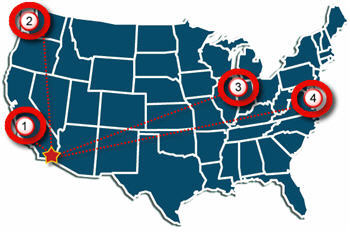
Connection 1: San Diego to Los Angeles

Connection 2: San Diego to Seattle

Connection 3: San Diego to Chicago

Connection 4: San Diego to Atlanta

Note: For viewing a streaming movie, or webcast, the Download speed is the important number.
Note 2: Just noticed my ‘Atlanta’ circle is not over Atlanta…
All of these connection tests were done within 5 minutes. I used the connection test at Speakeasy.net (see 12/14/06 post for more info). Last, I am on a Fiber Optic connection, so your results may not reflect these numbers.
Whose Idea Was This? (Vista Recycle Bin)
So I have been working with Windows Vista on my primary machine for a while now and I still keep finding things that make me pause.
Now when you right-click the recycle bin to empty (delete) your files there is a new option – Delete. But this is not the delete your files delete, it is the delete the recycle bin delete!
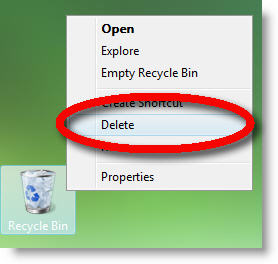
Hmmm, maybe not the best place for a command named this…
– Troy @ TLC
iFilm PPT Contest Voting Ends Today – Cast Your Vote
A few weeks ago I mentioned the iFilm PowerPoint contest. The went through all the entries and came up with the finalists for everyone to see and vote on. Well, today is the final day to cast your vote – click here to see the finalists and cast your vote.

I cannot say any of these presentations really jump out and wow me… My personal favorite, primarily because it made good use of many of the PPT 2007 effects (like the opening text) and lots of good animation (always something I look for!) is the “My Best Life Achievement” entry (and it got my vote).
– Troy @ TLC
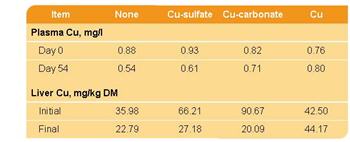
Designer Look for Tables (2)
To add the rounded corners to the table I just cheated a bit…
First I set the upper-left and lower-right cells to no fill (note the text in the upper-left is now the same color as the background and cannot be seen).
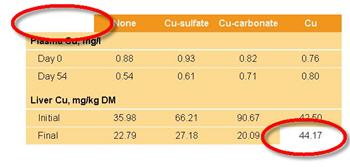
Second I created two rounded corner autoshapes. Each filled with same color as the table background and sent to back. I then positioned them to align with the edges of the table.
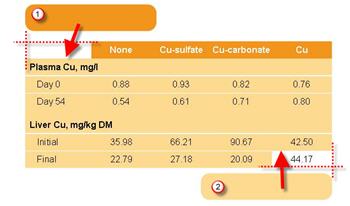
Finally I grouped all three elements so they could easily be moved. The final result is a table with two rounded corners.
– Troy @ TLC
Designer Look for Tables
Tables contain lots of data – but often they do not blend with a presentations overall color scheme or design cues. Here is one example from a recent project that incorporated both the color scheme and design elements.
Color Scheme:
I filled the header bar with same color used for the bullets, bold text, and slide title area. The body of the table is filled with the presentation secondary color that was used throughout on several elements.
Design Cues:
The upper-left and lower-right feature rounded corners. Circles and rounded corners where a major design element throughout the presentation.
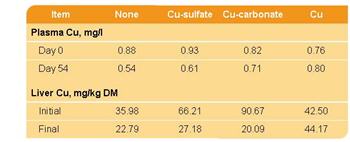
Up Next: How the rounded corners where created.
– Troy @ TLC
Article on PPT and Sales Presentations
Ran across this well written article about PowerPoint and sales presentations. The content really applies to any speaker support presentation.

I have never heard of Reliable Planet, but they definitely allowed one of their writers to hit the mark with an accurate and well written piece. Worth reading and bookmarking.
– Troy @ TLC
Caution: Quicktime Pro and Vista’s Ready Boost
Last week while developing an OFX based awards presentation (OfficeFX is a 3D****) I needed to convert provided Quicktime movies to a supported format. No problem, open each movie in Quicktime Pro and Export to an .avi. WRONG – export errored out. I then spent the next several hours troubleshooting by installing, uninstalling, hacking option settings and registry entries – nothing worked.

A few days later I figured out the problem. I have been taking advantage of Vista’s ReadyBoost technology (using a USB memory stick as an extended memory cache). Turns out Quicktime’s export feature is not compatible with ReadyBoost. Remove the USB memory stick – export movies from Quicktime Pro. Now you know too.
– Troy @ TLC