
Windows ML-Noise Suppression and Background Music
Coming soon to a Windows based computer! The rollout is slated for February through March 2022; ML-Noise Suppression.

What is ML-based noise suppression?
When researching this new Windows feature the phrase “ML-based noise suppression” was used a lot. So I had to identify what it was. It is “Machine Learning based noise suppression”, or AI (Artificial Intelligence). This feature is not entirely new. ML-based noise suppression was released earlier in Windows as an option users could turn on, but with this rollout it is now enabled by default.
How does it work?
The simple description is “ML-based noise suppression considers any non-speech signal picked up by the microphone as noise which should be suppressed.” Microsoft says “[our] noise suppression feature works by analyzing an individual’s audio feed and uses specially trained deep neural networks to filter out noise and only retain speech. While traditional noise suppression algorithms can only address simple stationary noise sources such as a consistent fan noise, our AI-based approach learns the difference between speech and unnecessary noise and is able to suppress various non-stationary noises, such as keyboard typing or food wrapper crunching.” The newest feature to this system is that “non-speech” also now means background music.
Where do we see it?
I am not entirely sure where this new background music suppression will show up. It is currently integrated into Microsoft Teams Desktop App for video and audio calls. I can see this being leveraged within PowerPoint’s record feature, and potentially by other applications (e.g. Zoom or other live microphone apps).
This is the notification seen in a Microsoft Teams meeting or call if the ML-based noise suppression is activated:

How do we turn it off?
If there is an option to turn on or enable, High Fidelity (music) Mode, that tells the machine learning system to allow music to be included.
The Microsoft Office Blog has a nice article written by one of the PM’s here.
Troy @ TLC
Download the TLC QAT
The TLC Creative design team leverages the power of the QAT with 64 immediately available tools!
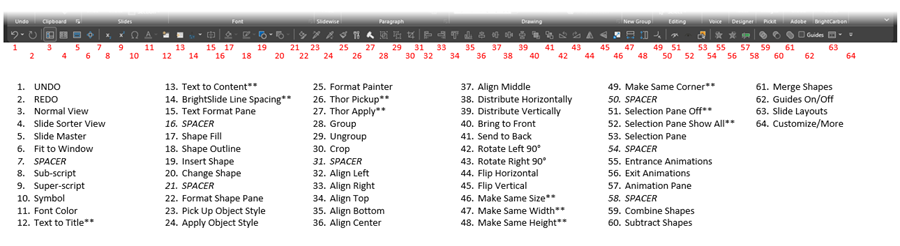
We run the same QAT on every computer, making it easy for our team to work on any computer.
NOTE: the items with the ** indicate this is a third party plugin feature (the icon will show up when installed, but not available if plugin is not installed on that computer). These are a combination of BrightSlide, ToolsToo, and PPTools features.
TIP: A custom QAT can be installed on any rental computer to give it a familiar interface! (if it has a custom QAT, export it and when done with the project, restore the original QAT).
See this previous blog post for how-to import a preset QAT (like the one you can download from the post!): https://thepowerpointblog.com/tlc-powerpoint-qat/
Download the TLC Creative QAT HERE. Note: download is a .zip file.
Troy @ TLC
Format Shape and Format Text on the QAT
At TLC we use the QAT (Quick Access Toolbar) in PowerPoint on every computer in our fleet so our design team members can work seamlessly.
Two features added to our master QAT minimize the number of clicks needed to get to the Action Pane needed at the time:
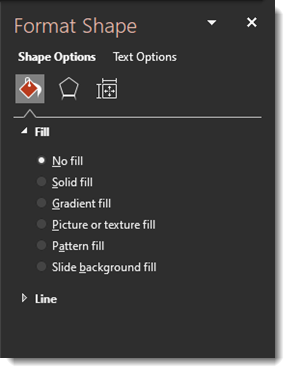
1. Format Shape with focus on the Shape Options.
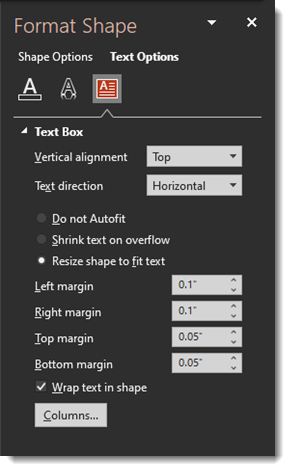
2. Format Shape with focus on the Text Options.
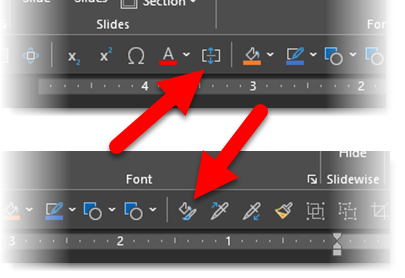
The top icon is technically the MORE OPTIONS > MORE ALIGNMENT OPTIONS > TEXT ALIGN MORE OPTIONS DIALOG.

This amazing QAT button opens the FORMAT SHAPE action pane on the right to the TEXT OPTIONS tab, when any text box is selected.
The bottom icon in the above image opens the FORMAT SHAPE action pane on the right to the SHAPE OPTIONS tab. When searching for the icon to add in the Customize QAT dialog, look for FORMAT OBJECT > FORMAT SHAPE > OBJECT FORMAT DIALOG.

Troy @ TLC
The Presentation Podcast Talks About Internal and Independent Presentation Designers
New episode of The Presentation Podcast available today! This episode is a conversation about Internal vs. Independent Designers about the mindset of how each designer approaches the task of visual design for presentations. How each reacts to client requests for the presentation, the design, or the template. And with special guest Lori Chollar of TLC Creative Services!
Listen here.
Slide Layouts on the QAT
This is something new on the TLC Creative PowerPoint QAT – Slide Layout (QAT stands for Quick Access Toolbar).
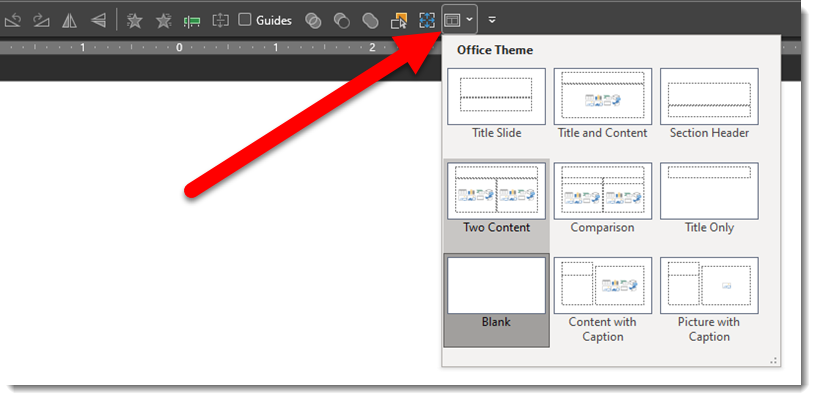
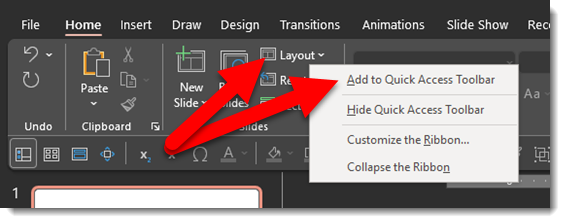
I am constantly looking for new ways to improve work flow while editing slides in PowerPoint. I’m not certain why this feature was not added years ago! Checking what Slide Layout is used for a slide, or changing a slide’s Master Layout is a tedious process of going to the HOME tab, then the SLIDE LAYOUT drop-down, and seeing the applied layout for that slide. To streamline the process, and make the Slide Layout option available at any time (eg. when not on the HOME tab), it now has a permanent home on the QAT (Quick Access Toolbar).
To add this to your QAT:
- Go to the HOME tab
- Right-click the LAYOUT icon
- Select ADD TO QUICK ACCESS TOOLBAR
- Done!
Troy @ TLC
“Microsoft 365” on the Splash Screen
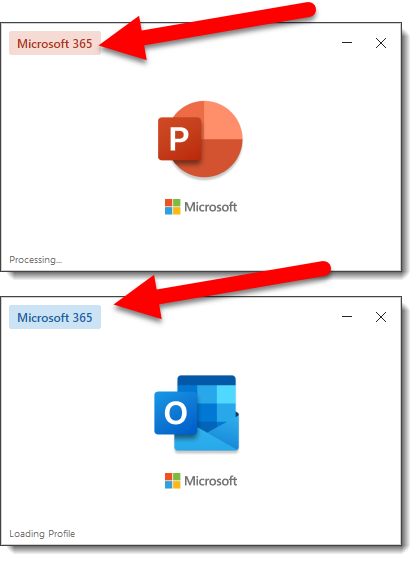
So, this new – well not really that new. I just noticed the “Microsoft 365” badging on the splash screen (seen when PowerPoint loads). First, it is no longer “Office 365” – which changes my now often used acronym “O365” when referring to Microsoft Office. And second, after doing a bit of online research, the “Microsoft 365” badging has been there for many months (guess I am multitasking while apps load and not looking at the startup splash screen).
Troy @ TLC
ToolsToo v10 Available!
The ToolsToo PowerPoint add-in recently released a big update, version 10.0.0.0.
We run this add-in on all design computers at TLC Creative and find many features invaluable. Here on ThePowerPointBlog ToolsToo has been reviewed and referenced several times (most recent full review looks like it was in 2016, here).
Version 10 has several new features that I have been experimenting with:
- REMOVE DESIGN ELEMENTS: this is pretty cool. 1 click to remove all non-placeholder content on slide master and slide layouts. This includes placed images (full background, logos, etc.), placed PowerPoint shapes/lines/text boxes/basically everything but the placeholders.
- For me so far, I would like to see this tool expanded to be able to just strip out content from a selected slide layout (vs. every layout in a file).
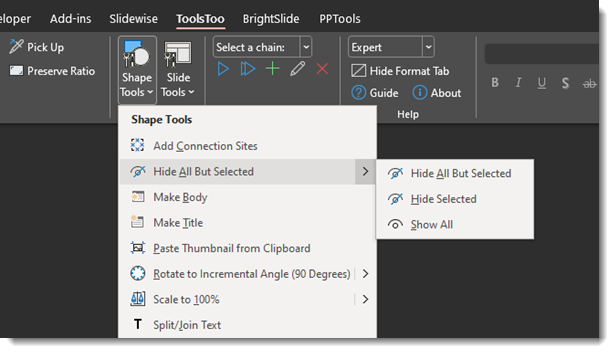
- HIDE ALL BUT SELECTED: Actually, not certain if this is brand new, but it is a huge time saver when designing. Select 1 or more elements on a slide, use this tool to turn them off in the Selection Pane, without opening the Selection Pane! One step further is the option to do the opposite, select 1 or more elements and hide (or turn off in the Selection Pane) everything not selected!
- Also, each tool can be separately added to the QAT
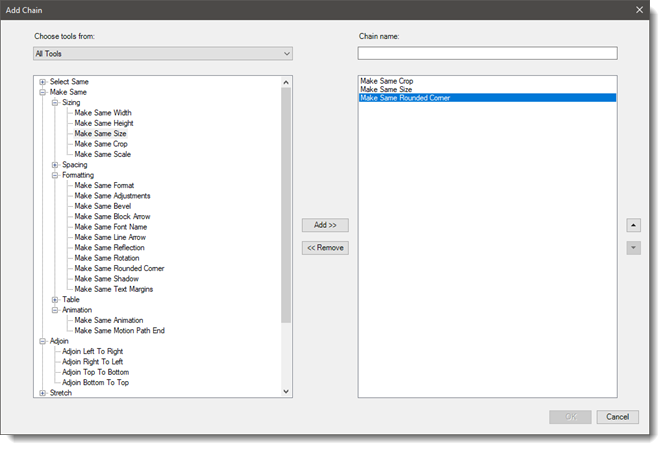
- TOOL CHAINS: Basically, this allows every user to create their own multi-action custom VBA code. It is constrained to using only Toolstool PowerPoint tools (I am hopeful that this great feature will expand to allow native PowerPoint tools and maybe even other 3rd party tools be included in a chain – please!).
- The interface for creating Chains is simple. Find the tool on the left, add to the right column, adjust order on right, give the Chain of actions a name and save.
Note: ToolsTool is a PowerPoint for Windows add-in (no Mac version option and does not work with PowerPoint for Web).
Get more information at the ToolsToo website here. ToolsTool is $20 and not only an amazing set of productivity tools, but an amazing value!
Troy @ TLC