
ToolsToo Modes
The ToolsToo add-in is an amazing productivity suite of tools for PowerPoint (in my opinion). One of the unique options in the suite of tools is the “UI Mode” settings.
This is something I have said for 20-ish years — PowerPoint should have multiple interface layouts to cater to the different uses and user levels. And I can trace this conversation back many years, with Austin Myers, a former Microsoft MVP for PowerPoint, who was the first person I heard talk about this idea for PowerPoint – and that was in the pre-.pptx era of PowerPoint! The idea of PowerPoint has different Ribbon layouts, or interfaces, that would allow the user to choose which configuration works for them.

What reminded me of this past conversation was the ToolsToo PowerPoint add-in. ToolsToo has 3 different toolbar preset layouts. In the Settings for ToolsToo, on the General tab, is the UI Mode setting. When ToolsToo is first installed, one of the dialog options sets the UI Mode for that computer’s ToolsToo interface. Note: this setting can be changed at any time.
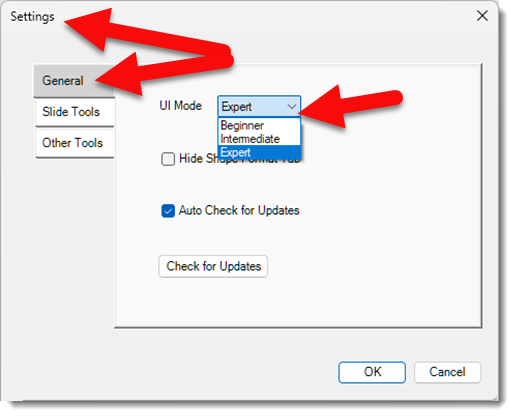
ToolsToo has over 75 features and functions. The developer recognized this could be overwhelming and created 3 versions of the ToolsToo toolbar. The ToolsToo toolbar (say that 5X in a row!) is based on the UI Mode selected. The concept is simple. If you want the basic and core functionality, the Beginner UI mode is going to limit the ribbon to make just those features available. If you want more, select a UI mode that displays more.
Beginner ToolsToo toolbar:

Intermediate ToolsToo tool bar:

- Note: the right section of the toolbar is all standard PowerPoint tools, now also available on the ToolsToo toolbar.
Expert ToolsToo tool bar:

- Note: the right section of the Intermediate and Expert toolbars is all standard PowerPoint tools, but now also conveniently available on the ToolsToo toolbar.
Like PowerPoint, design apps such as Photoshop, Illustrator, and InDesign also have many features, and the tools can be overwhelming. Yet each has a layout and UI views that streamline the tools and features to your workflow needs.
PowerPoint has a lot of menus and buttons, which are not all needed based on your workflow or skill level. The idea of a selection of preset ribbon layouts, or even better, the ability to customize (and export as .XML files to share with others), PowerPoint ribbon layouts would be a great addition to an already great application.
I’m just grateful that ToolsToo accomplishes this with its UI modes. ToolsToo is a wonderful suite of functional improvements to enhance PowerPoint design and formatting. (Before Mac users get too excited, ToolsToo is Windows only – sorry!). The add-in is under $25, and everyone on the TLC Creative presentation design team has it installed on their computer and uses it as part of their daily workflow.
Get more info and details at the ToolsToo website, https://toolstoo.com
Troy @ TLC Creative