Resource/Misc

What Service Pack 2 (SP2) Brings To PowerPoint

I have had a lot of email and talking with people/clients about the recently released Service Pack 2 for Office 2007. I believe it is critical for PowerPoint users as it fixes, and adds, a number of key design features.

I pulled this list from Microsoft’s (Knowledge Base) KB article 953195.. It covers all Office applications, but these are the PowerPoint specific items – which I have reworded a few to make them easier to understand.

……………………………………………………………

Better Edit Points: Freeform shapes have usable Edit Points, plus increased interoperability with Office 2003.

Ungroup SmartArt Objects: Officially it says “A new XML-based representation of each SmartArt graphic in a document is saved with the file to optimize interoperability.” Which I believe is referencing the HUGE improvement that you can now ungroup any smartart object!

Faster File Save: Smarter picture compression in PowerPoint’s XML file format (.PPTX) now saves up to 90% faster than before when the presentation contains a lot of pictures.

Steadier Zoom While Editing: “Some commands, such as deleting the selected object when zoomed in would cause the slide view to snap to the center of the slide. Now the zoomed-in slide view does not move on its own.” This means less scrolling around while zoomed in and editing!

Adjust Lines without Extending to Infinity: Officially stated as “Fixes several issues that involve the object model. These fixes let you better achieve parity with Office 2003 when the object model works with graphical objects.” Which for me means I can resize a line while constraining with the Shift key and actually resize it (not have it zoom off into infinity).

Text Overlaps: Some third-party printer drivers could provide bad information, causing PowerPoint to misalign text. It now detect this situation and uses alternate settings that preserve the proper text spacing.

Vista Preview: PowerPoint is now compatible with the Vista file preview commands.

Image Exports: Images exported from PowerPoint could be corrupt or cropped. This is now fixed and the setting produces a good bitmap.

Slide Thumbnail Highlighting: Colors and effects used to indicate when the mouse was over a slide thumbnail, and when the thumbnail was actually selected could occasionally become confused and might indicate a slide was selected when it was not. These are now clearly defined and update properly.

Saving to .PPT with Styled Title Text: Some of the new text formatting in PPT 2007 has to be represented as a picture when saved to the older .PPT format. Sometimes this would cause both a picture and styled text to be saved when it appeared in a title placeholder, giving the text a jumbled or blurred look. It now detects and displays one element.

Built-in Save As PDF/XPS: Users no longer have to download the add-in separately to have the PDF/XPS option in the Save As menu, it is built into SP2 for Word, Excel, and PowerPoint.

……………………………………………………………

– Troy @ TLC

By |2016-09-16T10:11:49-07:00June 13th, 2009|Resource/Misc|

“Create A Spark” PPT Contest

The folks over at Microsoft Office Online are hosting a PowerPoint contest!

“Create a Spark” is for PPT 2007 entries of short presentations (10 slides max). Submissions due by June 26 and win global fame on the internet!

Find all the details here.

– Troy @ TLC

By |2016-09-16T10:13:05-07:00June 7th, 2009|Resource/Misc|

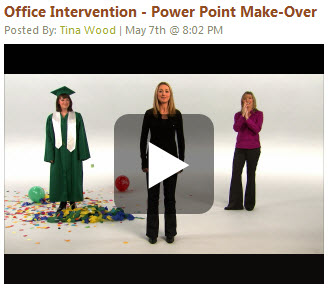
Check Out the PowerPoint “Office Intervention” Episode

I do not know the full background on the ‘Office Intervention’ clips, but they are well done and entertaining. Courtney is a real person who really is a law student with a real report (so the show premise is real). My friend Julie Terberg, a PowerPoint MVP, was called in as the expert for this episode.

Here is the link to the episode on Channel 10.

– Troy @ TLC

By |2016-09-16T10:14:09-07:00June 5th, 2009|PowerPoint, Resource/Misc|

Bing!

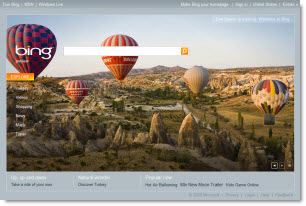
Microsoft unvieled it’s new search engine that has received some high praise within the industry. And yesterday it was released to the world early!

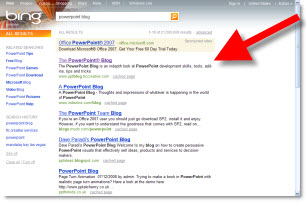
Bing has a lot of new features and technology for a search engine. Two of my favorites are type in a company name and it gives all the standard results, but also a customer service phone number. The other is great thing is ThePowerPointBlog remaining #1 when searching “powerpoint blog”! (actually 1st result is an ad for MS Office, it is MS’s search engine…)

– Troy @ TLC

By |2016-09-16T10:15:48-07:00June 2nd, 2009|Resource/Misc|

Category Upgrades to ThePowerPointBlog

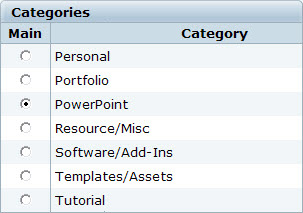
You may have noticed the search options have been updated with new categories. With over 3 years of PowerPoint related posts even I was finding it difficult to find things – and I wrote them all. Now searches can either be done by key word(s) in the Search bar, or with the expanded category list.

All posts, all the way back to January 2006 have been tagged with the new categories. Hopefully this will make ThePowerPointBlog a better resource for you. Try doing a category search for templates to find downloadable TEMPLATES and get ideas, or search for TUTORIALS to see all the tips and tricks in one long list of posts.

– Troy @ TLC

By |2016-09-16T10:16:54-07:00May 31st, 2009|Resource/Misc|

PowerPoint Contest (by SlideBoom)

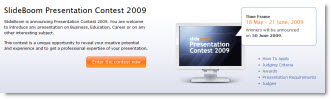
SlideBoom, the online presentation sharing site, has announced a new PowerPoint competition!

Here’s what they say:
This contest is a unique opportunity to reveal your creative potential and experience in creating PowerPoint presentation on Business,Education, Career or other interesting subject.

The top three winners will be awarded valuable prizes like SlideBoom Presentation Contest 2009 Winner Cup, a lifetime subscription for PRO account, advanced iSpring Presenter software and Gold Award badge.

Applicants are welcome to submit their works from 18 May to 21 June inclusive. Winners will be announced on 30 June 2009.

Learn more at the official contest page.

– Troy @ TLC

By |2016-09-16T10:18:55-07:00May 25th, 2009|PowerPoint, Resource/Misc|

Office 2010 The Movie

Two things:
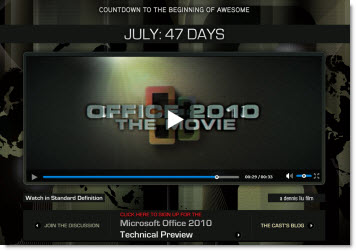
1. Microsoft is definitely showing they know how to have fun. Check out the movie trailer for the upcoming release of Office 2010 here.

2. Microsoft has officially announced a Technical Preview (aka ‘Beta’) of Office 2010 – so we are getting closer to the release date! It is a limited invitation program…

– Troy @ TLC

By |2016-09-16T10:20:46-07:00May 19th, 2009|PowerPoint, Resource/Misc|

Oh My Eyes – Bad Diagram

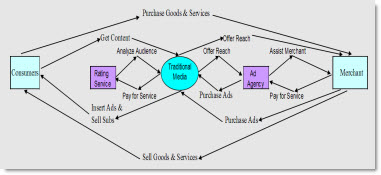
Here is a slide from a recent show that just made me cringe (presentation was supplied, so I had no editing or design input).

It does show all of the important information. But it does not have a balanced/aligned layout. It is difficult to figure out the message, text is small, and it did not animate to help show the flow. And it was a background slide for over 5 minutes…

– Troy @ TLC

By |2016-09-16T10:21:24-07:00May 17th, 2009|PowerPoint, Resource/Misc|

Office 2010 in 2010

Well it’s official. Steve Balmer commented earlier this week that the next version of Office will not be available there year, but next.

“Microsoft Office 2010, Microsoft SharePoint Server 2010, Microsoft Visio 2010, and Microsoft Project 2010 are scheduled to enter technical preview in the third quarter of 2009 and become available in the first half of 2010.”

– Troy @ TLC

By |2016-09-16T10:22:35-07:00May 15th, 2009|Resource/Misc|
Go to Top