
Free Halloween PowerPoint Template!
Christie is on the TLC Creative Design Team, and developed this fun Halloween themed PowerPoint template!
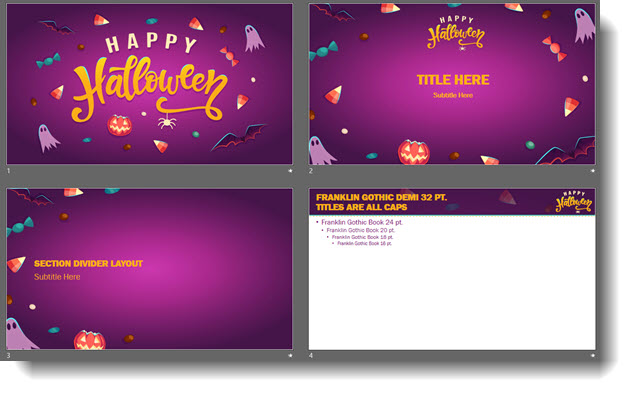
DOWNLOAD HERE – 1 MB, PowerPoint 2016, and FREE!
Troy @ TLC
New Book – A Trainer’s Guide to PowerPoint
Mike Parkinson, a Microsoft MVP for PowerPoint, has a new book available; A Trainer’s Guide to PowerPoint!
The subtitle “Best Practices For Master Presenters” is almost misleading in that it seems to limit the scope of this great resource. This is 180 pages of professional tip, after professional tip – and it is as much about presentation design as it is about presenting. The book is officially divided into 3 sections; Discovery (identify the presentation goal), Design (create the presentation), and Delivery (present). BUT, the Design section could easily be 2 or 3 sections. It has fantastic tips on developing the presentation content storyline (very different from designing the actual slides) and then a huge number of design tips (developing the actual slides in PowerPoint).
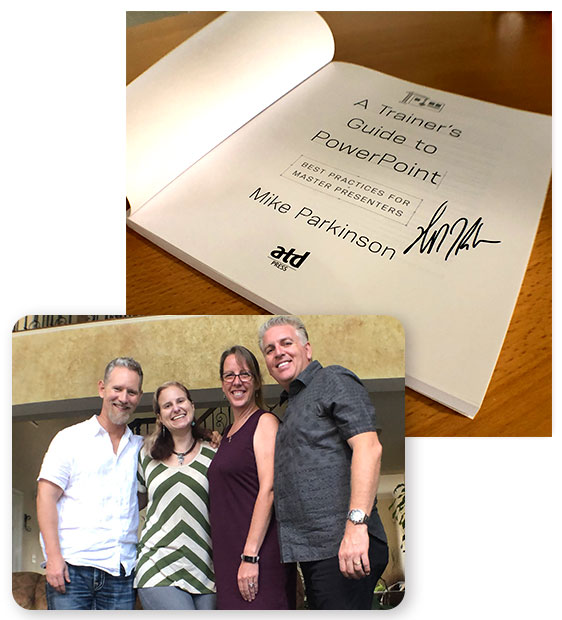
Not bragging, but on a recent visit to Washington, DC, Lori and I spent an afternoon with Mike and Jen Parkinson, and received an autographed copy of “A Trainer’s Guide to PowerPoint”!
Check it out here at Amazon.
Troy @ TLC
Presentation Ideas Conference 2018
Presentation Ideas Conference 2018 is happening soon!

PresentationPoint makes some amazing software to use PowerPoint to control digital signage (and more). They are sponsoring an upcoming online presentation conference that has a lot of great topics, information, and is FREE to register to attend!
TLC Creative’s Troy Chollar will be presenting at this year’s Conference 2018 November 28th at 11:00 AM (PST). Troy is bringing examples of recent “ultrawide” PowerPoint projects for “Really, Really BIG PowerPoint (Screen Size, not File Size)” talk and covering not only insights into the design process, but the technical how-to’s of developing an ultrawide PowerPoint file.
Website: https://www.presentationpoint.com/presentation-ideas-conference/
When: November 28-29, 2018
Cost: Completely free! Just register online to receive updates and reminders leading up to the event.
Speakers:
- Chantal Bossé – Your Key to Audience Engagement: PowerPoint’s Zoom Feature
- Troy Chollar – Really, Really BIG PowerPoint (Screen Size, Not File Size)!
- Ellen Finkelstein – 9 Techniques to Make Your Presentations Modern — So You Don’t Look So Old!
- Garland Coulson – 10 Creative Ways to Use Data In Presentations
- Geteesh Bajaj – 7 Secrets of Using Images in PowerPoint
- Kurt Dupont – The Simplest Way to Make Real-Time Data Presentations
- Sharyn Fitzpatrick – Best Practices on How to Transition to Online Presenting
- Garland Coulson – The Lazy Man’s Method to Fast Easy Content Creation
Free Online Talk Time Calculator

Real World:
– Today I received a presentation from a client and their script (for teleprompt, so I know they are saying every word in the script). The presentation has 43 slides, with 1 video. The script has 2,854 words. There is 1 video that is 90 seconds long. The agenda shows their talk time on stage is 20 minutes. Does all this work? Can we assume the presenter can accomplish this talk within their time allotment?
– Generally we plan 45 seconds of their time for the walk up music and crowd applause.
– The video is 90 seconds.
– Using a talk time calculator, 2,854 words at a standard rate = 22 minutes.
– 45 second walk up + 22 minutes talk time + 1.5 minute video = 24.25 minutes for the presentation… high probability of not being completed within the 20 minute slot.
So, how did I calculate 2,854 words = 22 minutes? www.Speechinminutes.com
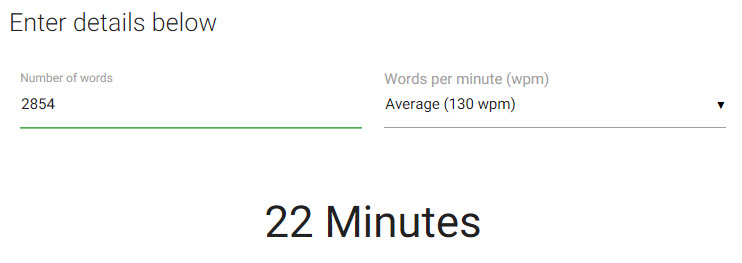
This is a very nice, free, online tool we use at TLC Creative Services for many projects. Hope it is helpful!
Troy @ TLC
2019 Presentation Summit (Location and Dates)
The Presentation Summit 2019 – Dates are reserved on my calendar!

Lori and I had a fantastic time at the 2018 presentation Summit hosted in San Diego, CA. Just putting out advance notice, the 2019 Presentation Summit website officially announces the location and dates for next year. Lori and I will be attending, hopefully presenting again and would enjoy seeing you there!
Website: https://www.betterpresenting.com/summit/
Who: 200+ attendees, 20 presenters, 14 Microsoft “PowerPoint” MVPs, a number of Microsoft PowerPoint developers and PMs, and representatives from many presentation industry companies
When: October 6-9, 2019
Where: San Antonio, TX
Troy @ TLC
The Presentation Podcast Episode #64 Released Today!
A new episode of The Presentation Podcast with a group of international presentation designers gathered together to talk about PowerPoint, what they see in presentation use and design, and lots of random topics. Join the conversation with Troy, Nolan, Glen Millar (from Brisbane, Australia), Chantal Bosse (from Quebec, Canada), Tom Howell – Mark and Sam (from Synapsis Creative in Sydney, Australia).
Episode, #64 – PowerPoint International Perspectives
Slide Background Color
Changing a presentation’s background color is made simpler with this quick shortcut. When changing slide background color, you’ll want to make sure you change it on the master layout, that way your changes will be applied to all slides, new and old. Normally, you could achieve this by going to View>Slide Master and that would open the targeted master layout.
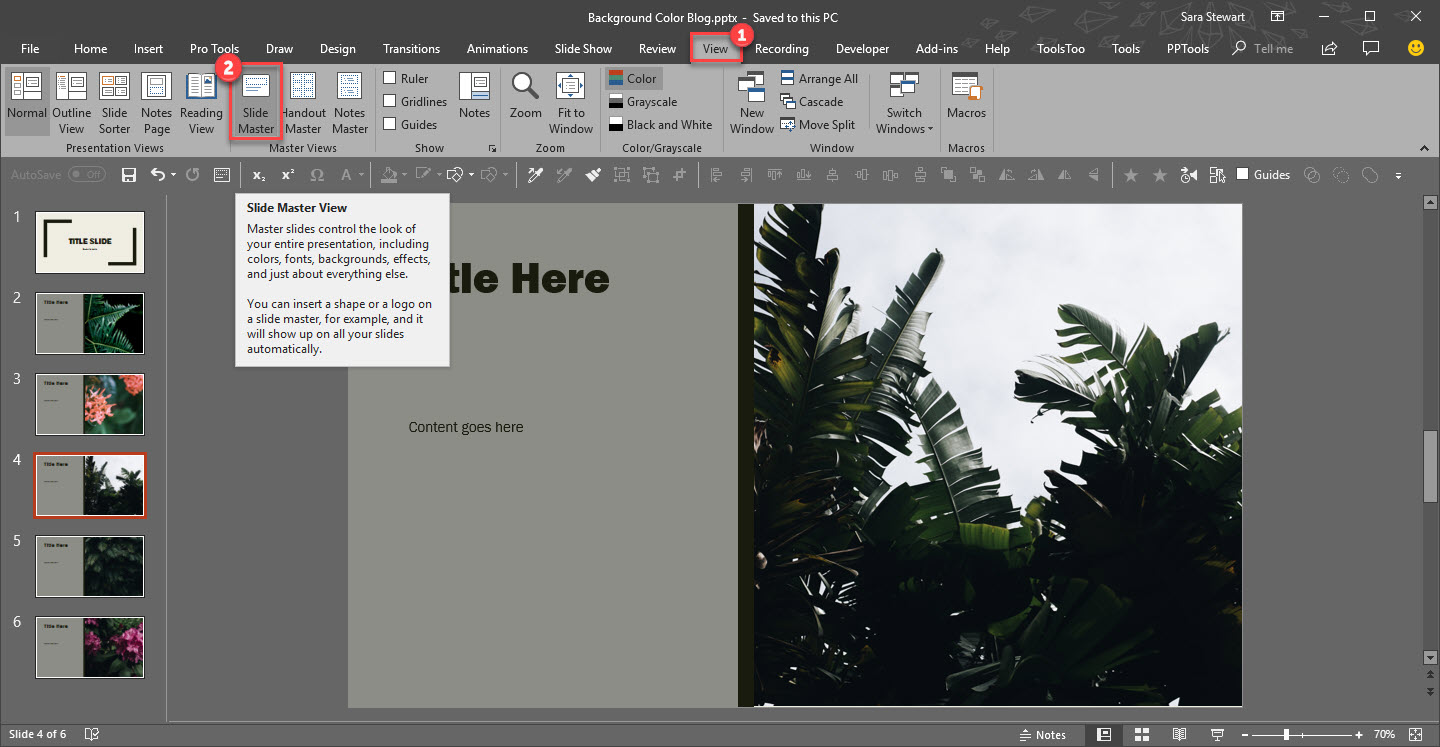
However, if you change the background on this slide, it will not apply to the template. Instead, you need update the background color on the Master slide at the top.
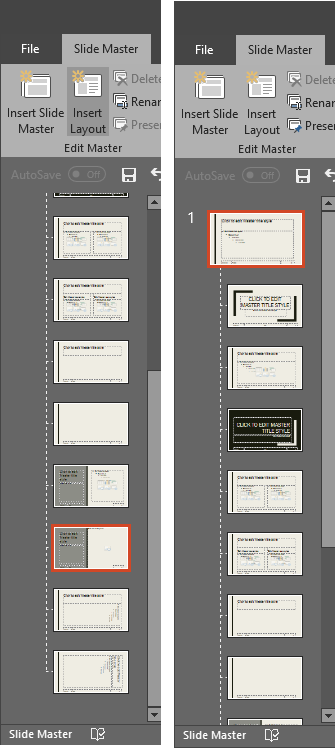
A quick and easy shortcut to achieve this is to simply hold SHIFT + DOUBLE-CLICK on the NORMAL VIEW icon in the lower right bar.

This is will automatically open the master to the top slide where you can quickly update all slide backgrounds.
[KGVID]https://thepowerpointblog.com/wp-content/uploads/2018/10/unnamed-file-3.mp4[/KGVID]