
The Presentation Podcast Episode #32 Released Today!
A new episode of The Presentation Podcast with Troy, Nolan, and Sandy is available today! Check out their latest discussion on “How to be a Good Design Client.”

Add us to your favorite Podcasts on iTunes, Google Play, Stitcher, SoundCloud and more at The Presentation Podcast.
The Presentation Podcast Episode #31 Released Today!
A new episode of The Presentation Podcast with Troy, Nolan, and Sandy is available today! Check out their latest discussion on “What Makes a Real PowerPoint Template Real.”
Add us to your favorite Podcasts on iTunes, Google Play, Stitcher, SoundCloud and more at The Presentation Podcast.
The Presentation Podcast Episode #30 Released Today!
A new episode of The Presentation Podcast with Troy, Nolan, and Sandy is available today! Check out their latest discussion on “Windows 10 Fluent Design and the Future of Presentation Design” and add to your favorite Podcasts on iTunes, Google Play, Stitcher, SoundCloud and more at The Presentation Podcast.
The Presentation Podcast Episode #29 Released Today!
A new episode of The Presentation Podcast with Troy, Nolan, and Sandy is available today! Check out their latest discussion “What Else Do You Use PowerPoint For?” and add to your favorite Podcasts on iTunes, Google Play, Stitcher, SoundCloud and more at The Presentation Podcast.
IOS PowerPoint Morph & Zoom Test File
PowerPoint’s Morph (transition/animation effect) and Zoom (new custom shows) have had an amazing adoption rate and become something we use in projects on a regular basis. The addition of support for both effects on mobile versions of PowerPoint has happened fairly recently. Amber on the TLC Creative Presentation Design Team created a fun, small file size, sample presentation setup with Morph transitions and Zoom custom shows for us to test and see how they work on our mobile devices.
Use this link to download our test file and open on your mobile device to see if Morph and Zoom are included/working on your mobile version of PowerPoint – Download test PPTX file here
After downloading, it is important to open with Microsoft PowerPoint on the device, not a PowerPoint viewer application. For iPhones (IOS), this means click-and-hold the file name to bring up a list of applications it can be opened with. Select the Microsoft PowerPoint icon.
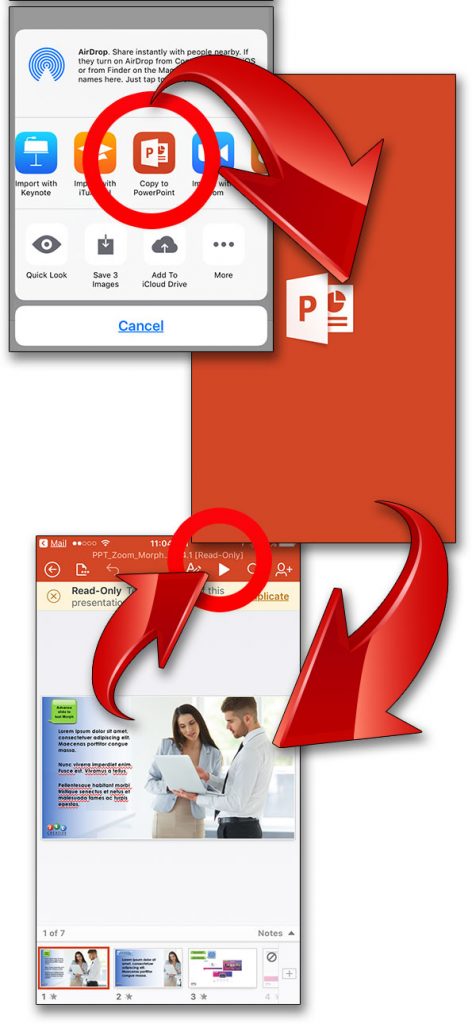
Download > click-and-hold to select “Copy to PowerPoint” > the mobile version of PowerPoint opens > Presentation opens > click the Play icon to view as a slide show.
Here is a quick video capture showing the visual effects that should be seen on the mobile PowerPoint apps.
[KGVID]https://thepowerpointblog.com/wp-content/uploads/2017/04/unnamed-file-1.mp4[/KGVID]
Troy @ TLC
The Presentation Podcast Episode #28 Released Today!
A new episode of The Presentation Podcast with Troy, Nolan, and Sandy is available today! Check out their latest discussion “Deposit, Terms, and $ for Presentation Design” and add to your favorite Podcasts on iTunes, Google Play, Stitcher, SoundCloud and more at The Presentation Podcast.
Video Frame Rate – A Beginners Guide
Video in presentations has been something I have always embraced as a design tool. Fortunately, my design background includes lots of video production. So the many of the nuances of video files – and the finicky needs of Windows and PowerPoint (especially in legacy versions) – did not leave me with too many problems that could not be resolved. Today, video use is easier (thanks Windows 10 for supporting .MP4!), but it is still good for advanced users to know video format basics.

TechSmith (makers of Camtasia and SnagIt) recently put this tutorial online about video frame rates, which is a technical topic. It explains the concepts easily with video examples and feel it is a good resource to share. Check it out here.
-Troy @ TLC