Connector for the Connector to the Connector
This was the setup on the provided computer at a recent meeting. Surprisingly, everything worked fine!

(1) Full size Display Port to (2) DVI to (3) HDMI to (4) HDMI cable.
– Troy @ TLC
This was the setup on the provided computer at a recent meeting. Surprisingly, everything worked fine!

(1) Full size Display Port to (2) DVI to (3) HDMI to (4) HDMI cable.
– Troy @ TLC
This year, TLC Creative Services finally updated its website (which is still in process). I am very happy with the new site and additional information it provides. When developing applications, and websites, PowerPoint can be a great tool in the initial stages.
For example, here is the TLC website mocked up in PowerPoint.

Each item is a separate, and editable, PowerPoint shape. The navigation labels can be revised, their order adjusted and the drop down menus revised.

Just another example of using the flexibility of PowerPoint to accomplish more than just “slides.”
– Troy @ TLC

Earlier this week, a post released a copy of our internal PowerPoint Video test slides. It was drawn to my attention that there were 2 errors in the slides (1. the .avi was not set to play automatic like all others, 2. the .mpg1 was a really badly rendered video). Thank you for the those that sent emails!
The original post’s download link has been updated with a revised version of the PowerPoint Video Test Toolkit and here is same link:
Download here.
– Troy @ TLC
For TLC Creative Services, I developed a slide deck that the 5 most common video formats. To test a computer’s setup, we just open this PowerPoint presentation, go to the video format we want to confirm the computer is configured to play and see what happens. If the video plays, we know the computer and PowerPoint are setup for that format and then can troubleshoot the client file with the knowledge that it is not the computer or PowerPoint.

Feel free to download our PowerPoint Video Test Toolkit and use as needed.
Download here (24 MB).
Also, check out the Sept 11 post of the video reference chart to know if a computer’s configuration is going to play a video format.

– Troy @ TLC
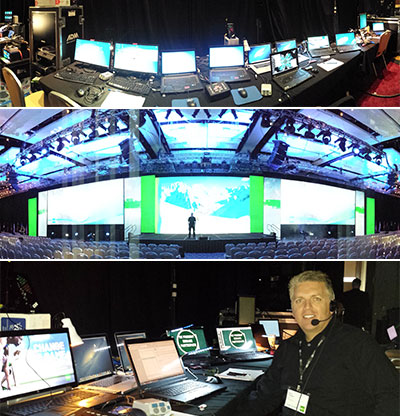
Earlier this week, I was in Washington DC as the showsite Graphics Op/presentation designer. Great event (even with the government shutdown that cancelled a number of the scheduled presenters). There was a lot going on for presentations, videos, live camera and more. My “desk” requirement was room for 6 computers – here is my setup with 5 of those computers (one is an external monitor):

– Troy @ TLC
Here is an amazing video showing a 1000 years of border history in Europe.
[original video no longer available from source]
Yes, you could fairly easily develop this video in PowerPoint. It would be what we internally call a “Flip Book” animation. One static slide per border change. Then set all slides to auto transition (with the CUT transition) and .01 to .05 seconds for the AFTER setting. When played, it will give the same effect as the above video – although sourcing the data and customizing the country shapes to each border would be a very large project! The video creation would be a simple as FILE>>EXPORT>>CREATE A VIDEO.
Here is a quick video I developed in PowerPoint using the Flip Book animation styling with a vector map of the United States (which was missing in the above video) and exported as a video.
[youtube src=”https://youtube.com/embed/Fpqd3v9gl7A?rel=0″]
57 slides, no animation, auto transitions, exported as video.

– Troy @ TLC
Today is the conclusion of this 2013 Presentation Summit. The event has been great, spending time with many friends has been great, spending time on the beach in Fort Lauderdale, Florida has been great, and leading my final session entitled “Don’t Be That Guy – to the AV Crew” has been great!

The topic was an overview of what presenters should know about AV and large meeting technical setups to have a successful meeting – and success starts with working with an event AV crew.
Note: Next year the Presentation Summit is on the West Coast in San Diego, CA – hope to see you there!
– Troy @ TLC
Today was a wonderful day in Ft. Lauderdale, Florida at the 2013 Presentation Summit. My session, entitled “PowerPoint is My Creative Suite,” had full attendance and we covered a lot of great projects we have done in the past 6 months at TLC. Specifically projects, tips & tricks, and fun stories of using PowerPoint as a editor or authoring tool for everything but presentations.

– Troy @ TLC
Microsoft has partnered with Atari to bring a number of classic games to your web browser – assuming you are using Internet Explorer 10. What fun!

Open Internet Explorer and go here: https://atari.com/arcade#!/arcade/atari-promo Very addictive for someone that grew up with the classic Atari 2600 and arcade games.

And they work with the touch screen version of E10 (tested on my Surface Pro – extensively).
– Troy @ TLC
My friend, and Microsoft MVP for PowerPoint, Geetesh has posted a great list of all keyboard shortcuts for PowerPoint 2013.

See it here.
– Troy @ TLC