Software/Add-Ins

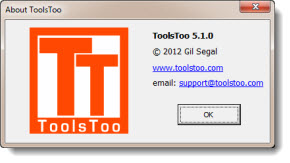
New Version of ToolsToo Add-in Released (v5.1)

If you are regular visitor here, you probably know I am a big add-in/plug-in user for all programs. For PowerPoint, add-ins installed on all designer and show computers are those that make design work faster and easier. And the ToolsToo add-in is used daily.

Last week v5.1 was released. It adds a few new features and bug fixes. Also interesting, this is the first add-in I have seen that is only for use with PPT 2010, not 2007 (since v5.0) because it uses some PPT 2010 only features (such as the animation paintbrush). Although v4.5 is compatible with PPT 2007 and 2010 and still available. And, like almost all add-ins, it is only compatible with the 32-bit version of Office.

Website with more details and download options is here.

– Troy @ TLC
By |2016-08-16T09:22:04-07:00July 11th, 2012|Software/Add-Ins|

Ubitmenu Puts PPT 2003 Menus into PPT 2010

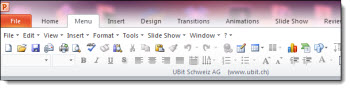
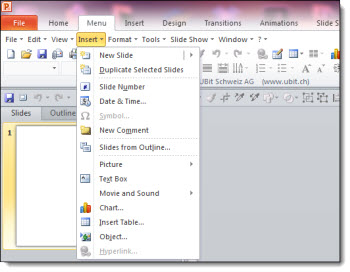
The number of companies moving from Office 2003 to Office 2010 over the past year has been amazing. They skipped Office 2007 and are now going from menus in 2003 to the ribbon in 2007 or 2010, which is a bit like starting over – and a focus for many TLC Creative Services onsite PowerPoint training programs. The Ubitmenu.com add-in can make the transition easier by bringing the familiar PPT 2003 menus into the new ribbon interface.

The add-in does not remove or alter the ribbon. It remains accessible and full function after the add-in has been installed. The Ubitmenu add-in adds a new tab called “Menu” and in it are all the familiar PPT 2003 menus which let you work in PPT 20007/2010 almost like you did in PPT 2003.

The ribbon interface is here to stay, so the best course is to become familiar with it. But I can see the Ubitmenu add-in as a good option during that transition period. It is free for personal use. Read more and download from this Swiss company here.

– Troy @ TLC
By |2016-08-16T09:22:24-07:00July 9th, 2012|Software/Add-Ins|

My IP Address Shows What?

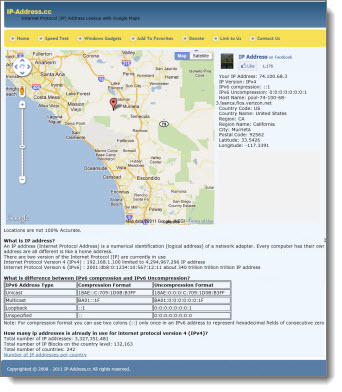
This is a pretty amazing use of technology. An IP address (Internet Protocol Address) is unique to every web enabled device. When you log onto the internet, you provide some details about yourself, such as the country and region you are in. But this website overlays that information on a Google map and shows where you are!

Click here to go to IP-Address.cc to see where you are with the IP address lookup.

– Troy @ TLC
By |2016-08-16T10:01:33-07:00August 1st, 2011|Software/Add-Ins|

What Version of Flash is Installed On My Computer?

Flash is still a major component of many projects. On a recent presentation that integrated Flash elements, I ran into a need to know exactly what version of the Flash Player was installed on each computer.

I use this website to instantly tell me exactly what version is installed (Click here to open):

Note: Firefox and Internet Explorer (IE) use separate installs of the Flash player. If you use Firefox as the default browser but a Flash app does not work, be sure to update Flash player through IE too as most applications access the IE player (like PowerPoint).

– Troy @ TLC
By |2016-08-16T10:08:23-07:00July 11th, 2011|Resource/Misc, Software/Add-Ins|

IE9 Has Arrived

Last week, in a batch of 30+ updates nad security patches, Internet Explorer 9 was officially rolled out as an optional update.

I have running IE9 as my default browser for a week and everything is great. The minimal toolbar and tabs along the top provide larger web content area (which is great) and the integrated URL and search bar is easy to use. All of the MS Web Apps, which I use daily, work flawlessly.

Two features I really like are the ability to rearrange the tabs and the ability to “tear off” any tab and turn it into its own browser window!

– Troy @ TLC

By |2016-08-16T10:18:17-07:00April 20th, 2011|Software/Add-Ins|

Why Does My Add-in Not Install With 64-bit Office?

Following the previous post, this is another confusing issue I am hearing a lot. Here is the scenario:

– Super cool new 64-bit operating system computer
– Install the latest and greatest MS Office 64-bit
– Attempt to install favorite PowerPoint add-ins and nothing works….

Add-ins need to be written/coded to work specifically with the 64-bit version of PowerPoint. At this moment there are very few add-ins that have 64-bit versions. So, if you are running the 64-bit version of PowerPoint, do not plan on using any add-ins.

This of course will change over time as the add-in developers have opportunity to create 64-bit versions of the existing 32-bit versions (and I am waiting just like you for this to happen!).

– Troy @ TLC
By |2016-08-16T11:10:32-07:00August 28th, 2010|Resource/Misc, Software/Add-Ins|

64-bit Office vs. 64-bit Operating System

This question, or rather confusion, seems to be coming up quite a bit and I thought it would be good to clarify things.

1. Your computer operating system (Windows XP, Vista, Windows 7) can be either 32-bit or 64-bit. To be 64-bit the computer hardware/motherboard must support 64-bit processing. BUT you can have a 64-bit capable computer running a 32-bit operating system (OS).

2. Office 2010 is available in 32-bit and 64-bit versions. To install the 64-bit Office 2010, the computer must have a 64-bit operating system. AND the 32-bit Office 2010 can be installed on a 64-bit operating system.
– Office 2000, XP and 2007 are only available in 32-bit versions.

Basically, Office and the operating system are separate entities. Just because it is a 64-bit computer, does not mean it must use a 64-bit version of PowerPoint.

– Troy @ TLC
By |2016-08-16T11:11:04-07:00August 26th, 2010|Resource/Misc, Software/Add-Ins|

Review: ToolsToo PPT Add-in

ToolsToo is a productivity add-in for PowerPoint 2007 and 2010. It is a collection of incredibly valuable tools used when designing slides. It adds a full tab full of 20+ tools that I first tested on a test computer and quickly installed on my main computer and have integrated it into my daily production.

Some tools can be found in other add-ins and I cannot function without, such as:
Equal – width, height, size

And there are a number of tools that I am amazed have not been thought of before as they are so incredibly useful. Here are a few of my favorites:

Adjoin

and make line straight (veritical or horizontal)

AND any tool can be added individually to the QAT! As example: make equal width, make equal height and make same size buttons have been added to my QAT.

There is a free version offered called “ToolsToo Lite” that offeres a limited set of tools. The full tool set reviewed is $20 and is highly recommend.

– Troy @ TLC
By |2016-08-16T11:14:33-07:00August 12th, 2010|Software/Add-Ins|

The Magic of the Background Removal Tool

With Office 2010 now in full release this is one of those great new features that is difficult to explain, but a great asset to the new features of PowerPoint 2010 and several other Office applications. Back in the November Top 15 PPT 2010 features I listed the new Background Removal tool as #11. Tucker Hatfield is the Microsoft Program Manager I was quoting when I said it worked with “magic coding” – his words, not mine.

Around the same time, Tucker had a detailed post on the Microsoft Office 2010 Engineering blog (I know we all read it daily) about the Background Removal Tool. It is worth revisiting to grasp what this tool is capable of. The next few posts here will be examples and tips of my use of the Background Removal Tool.

View Tucker’s full post on the Microsoft Blog here.

Tucker also did a follow post on MS Engineering Blog here that went into more detail and a pretty cool example of the Background Removal tool in action.

– Troy @ TLC

By |2016-08-16T11:26:01-07:00June 19th, 2010|Resource/Misc, Software/Add-Ins|

PPTXtreme Add-ins and Windows 7 with PPT 2010

I am a huge fan of the PPTXtreme PowerPoint add-ins. They make much of my development time up to 5X more efficient and in some cases make the impractical, practical.

With PPT 2007 a few of the add-ins lost functionality. Namely ‘Color Picker’ and ‘Photoshop Import’ (which is one of those HUGE time saver add-ins for me).

Now with my new computers running Windows 7 and PPT 2010 I have the sad reality that none of the PPTXtreme add-ins function… I did some experimenting to try and find a solution like I did with Vista (where I installed outside the ‘Programs’ folder and then manually added permissions). The bad news is nothing, for me, got these add-ins functioning.

The good news is, it is not entirely PPT 2010 that is the conflict. Here is PPT 2010 opening and a selection of the PPTXtreme Add-ins loading – and working.

In this case it is PPT 2010 installed on a Windows XP Pro OS. My install tricks for Vista have no effect in Windows 7, so the sad reality is Windows 7 + PPT 2010 leaves PPTXtreme unavailable.

I have talked with the PPTXtreme developer and fingers crossed that there may be a round of development going into the add-ins as soon as this summer to update compatability (which would hopefully mean a fall time release).

Stay tuned for a hopeful update later this year.

– Troy @ TLC
By |2016-08-16T11:34:17-07:00May 24th, 2010|Software/Add-Ins|
Go to Top